Foodops
All docs

Menu · Updated 2026-08-24 · v05df8aa

Modifiers — Item Customization Groups

Audio narration for this article is generated with the weekly docs refresh.

NEW stack only (2026-06-29, July-2026 launch). The legacy haafai.app.foodops Blazor monolith is retired at launch. Modifier-group authoring now lives in the admin app (foodops-admin-app, admin.foodops.io — Catalog → Modifiers) backed by the sales API's ModifiersManagementController (hubits-api-sales); the counter POS (foodops.counter.app) renders modifiers at order time. Any Haafai.Restaurant.App/.../ModifiersController.cs (monolith) citation below has been re-pointed. The server is the pricing authority — at order create/edit the sales API overwrites each line as Price = ListPrice + Σ(modifier additions) (it ignores the counter's UnitPrice) [code: hubits-api-sales/Hubits.Sales.Api/Services/Counter/Orders/OrderCreationService.cs:607-612 @ 19190b9]. Modifier-group fields (DisplayOrder, MinimumSelection/MaximumSelection, MaximumGroupQuantitySelection, AutoPopup) live on the shared domain entity [code: haafai.domain/Haafai.Models/Entities/RestaurantManagement/RestaurantModifierGroup.cs:31,38-45 @ e1389444 (staging)].

What changed since 2026-05 (NEW 2026-06-03)

  • Auto Popup flag is now respected at the counter (d8ff58d 2026-05-06, foodops.counter.app) — useModifierSelection now checks group.autoPopup and only pops the modifier modal when at least one group has it on; otherwise it adds the product with default selections pre-applied. This reverses the prior KB fact that Auto Popup was a no-op / effectively always-on at the counter. See the Auto Popup field and Auto-popup on add-to-cart. [code: src/hooks/useModifierSelection.ts:25-37 @ e002374]
  • Serving quantity + unit per option (3e0e6dd 2026-06-03, hubits-api-sales + foodops-admin-app) — modifier options linked to a stocked variant can now carry a servingQuantity and servingUnitId, so one selection deducts a precise amount of that variant from stock. Authored on each option row in the admin modifier-group form. See the option table. [code: ModifiersManagementController.cs:701-712 @ 3e0e6dd; ModifierGroupFormDialog.tsx:636-668 @ f3ae3e9]

What changed since 2026-04-15 (NEW 2026-05)

Several modifier-related behavior changes shipped to counter.app and ordering.app since the last verification watermark:

  • Nested modifier structure normalization (17a4035 2026-04-25, foodops.counter.app) — OrderCard, OrderDetailsPanel, and OrderItems now normalize modifiers from API responses, supporting both flat and nested structures. OrderItems groups modifiers by their respective groups for better readability. OrderSummary enriches line items with detailed modifier information for offline display. Order creation/edit hooks now include modifier group names in the order item structure. Kitchen API service updated to reflect modifier structure changes.
  • Default-quantity initialization on modifier modal (66f8e79 2026-04-25, foodops.counter.app) — ModifierSelectionModal now initializes item quantities for default selections in modifier groups (avoids showing default-checked options with quantity 0).
  • Display-order sorting on ordering.app (9150862 2026-04-30, foodops.ordering.app) — modifier groups now sort by displayOrder and the UI rendering in src/components/menu/** was updated for clearer presentation on the customer-facing ordering page.
  • Dark-mode backdrop fix (2510b0c 2026-04-26, foodops.counter.app) — ModifierSelectionModal and other order/modifier modals updated their backdrop styles for dark-mode support.
  • Quantity handling on ItemDetailsModal (f2ebbfb 2026-04-30, foodops.counter.app) — ItemDetailsModal quantity handling refactored alongside UnifiedPrintButton and useOrderEdit; locking logic that prevented quick re-edit was removed.

The "Apply To" model, Multi Select / Auto Popup / Allow Qty / Min-Max / Is Default? semantics, and RestaurantModifierGroup data model are unchanged — ModifiersController.cs and Views/Modifiers/** in haafai.app.foodops saw no commits since the watermark.

Plain-English summary

Modifiers are the "how do you want that?" questions on top of a menu item. Size (Regular / Large), spiciness (Mild / Hot), add-ons (Cheese, Bacon), preparation (Well-done, Medium). You define them once as a Modifier Group with options, then attach the group to the products (or whole product categories) that should show them at the counter.

When you'd use this

  • Drinks come in three sizes → one "Size" group with 3 options
  • Shawarmas need spice level → one "Spice" group with 3 options, default Medium
  • Burgers allow add-ons → one "Extras" group, multi-select, each with a price
  • Pizzas need crust choice + size + toppings → three separate groups on the one item

Without modifiers, every variation is a separate menu item — clutters the catalogue and makes reporting impossible. With modifiers, the base item stays one row and variations become structured options that roll up cleanly in reports.

How to access

  • URL: /catalog/modifiers (admin app, admin.foodops.io) — the legacy monolith /modifiers page is retired at the July-2026 launch
  • Sidebar: under Catalog in the admin sidebar (next to Items / Categories / Menu Groups)
  • Requires the Modifiers: View role permission (default on Counter / Waiter / Manager / Owner / Administrator roles)

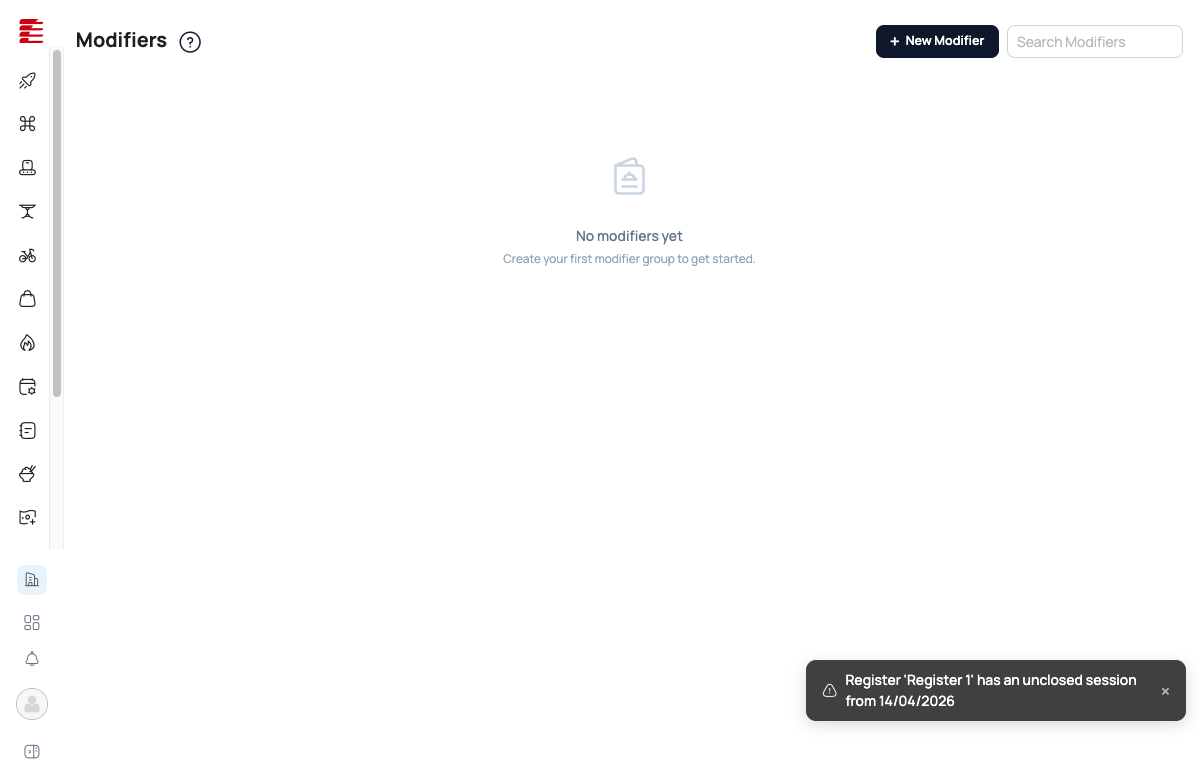
Modifiers page empty state — no groups created yet, prompt to create first group, New Modifier button

Prerequisites

  • At least one product or product category to attach the modifier group to
  • Role with Modifiers: Create permission to add new groups

Walkthrough — create a modifier group (admin / authoring side)

This section covers the staff-side authoring flow in the admin app (foodops-admin-app, admin.foodops.io — Catalog → Modifiers), backed by the sales API's ModifiersManagementController. The counter.app POS-display side is documented separately under How modifiers appear in the counter app below. (The old haafai.app.foodops Modifiers page is retired at the July-2026 launch.)

1. Click "New Modifier"

As of 79be9d0, this navigates to a full-page form at /catalog/modifiers/new — it no longer opens an in-page modal. (ModifierGroupsPage's openCreate now calls navigate('/catalog/modifiers/new'); the old inline ModifierGroupFormDialog render was removed from the page.) [UI-TODO live verify new page layout/copy — new screenshot needed to replace 51-new-modifier.png]

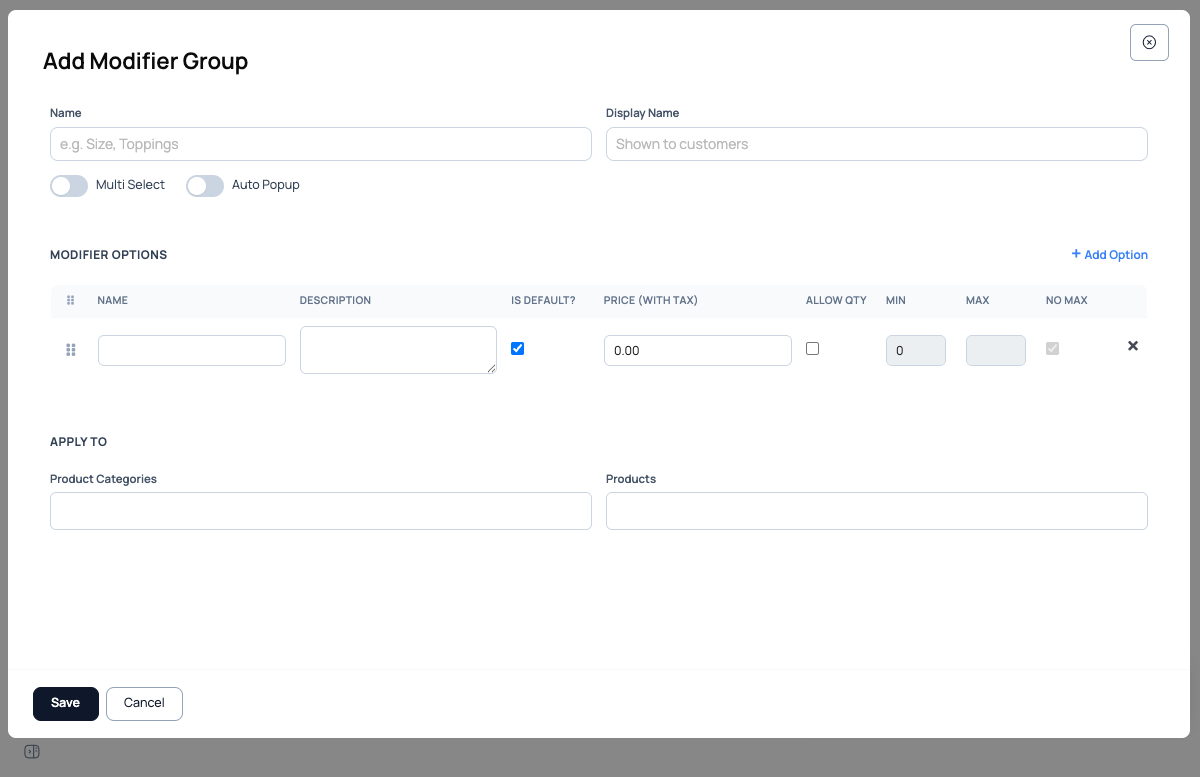
Add Modifier Group modal — fields for Name, Display Name, Multi Select, Auto Popup, options table with Name/Description/Is Default/Price/Allow Qty/Min/Max/No Max, and Apply To section with product-category multi-select (Beverages/Desserts/Shawarmas/Sides) plus product multi-select

2. Fill the group-level fields

[code: hubits-api-sales/Hubits.Sales.Api/Controllers/ModifiersManagementController.cs @ 19190b9; foodops-admin-app/apps/admin/src/components/menu/ModifierGroupFormDialog.tsx @ f6ffd0b]

Field Purpose
Name Internal identifier (e.g., "Size", "Spice Level", "Add-ons")
Display Name What the cashier sees at the POS — can be a friendlier label. Maps to ModifierGroup.displayName [code: src/types/modifier.ts:18]
Multi Select Checkbox. Unchecked = radio buttons (pick one). Checked = multi-select (pick many). Maps to ModifierGroup.isMultiSelect
Auto Popup Checkbox. Controls whether the modifier modal pops up automatically when the cashier adds the product at the counter. As of d8ff58d (2026-05-06) the counter.app now respects this flag: if at least one of the product's modifier groups has Auto Popup on, the modal opens on add; if no group has it, the product is added straight to the cart with each group's default options pre-applied (the cashier can still open it later via the pencil-edit icon) [code: foodops.counter.app/src/hooks/useModifierSelection.ts:25-37 @ e002374]. This reverses the prior KB note — earlier builds (pre-d8ff58d) ignored the flag and always popped the modal. Maps to ModifierGroup.autoPopup.

3. Add options

Click Add Option for each choice. Each row has:

Column Meaning
Name Option label shown to cashier and on receipt. Maps to ModifierItem.name
Description Optional extra detail. Renders as a small subtext line under the option name in the modal [code: src/components/modifiers/ModifierSelectionModal.tsx:484]
Is Default? Per-row flag — which option(s) are pre-selected when the picker opens. Maps to ModifierItem.isDefaultOption. The counter app reads default options via modifierService.getDefaultSelections() [code: src/services/modifier/modifierService.ts:175-184]
Price (with tax) Incremental cost on top of the base item price. Zero for no-cost variants (e.g. "Medium spice"); positive for add-ons; negative for discounts. Renders as (+5.00) next to the option name when > 0 [code: ModifierSelectionModal.tsx:478-482]
Allow Qty Allow the cashier to choose multiple of this single option (e.g. 2× cheese). Maps to ModifierItem.allowQuantityAdjustment — when on, the counter shows + / − buttons next to the option [code: ModifierSelectionModal.tsx:450-523]
Min / Max Per-option quantity bounds when Allow Qty is on. Maps to ModifierItem.minimumSelection / ModifierItem.maximumSelection
No Max Flag: disables the upper bound entirely. Maps to ModifierItem.noMaximumSelection
Serving Qty + Unit (NEW 2026-06-03) When an option is linked to a stocked variant (the "None"/variant picker), you can now set how much of that variant one selection consumes, plus the unit. E.g. an "Extra Cheese" option linked to the "Cheese Slice" variant with Serving Qty 2 and Unit pcs deducts 2 slices per selection. Two inputs ("Qty" number field, step 0.001, and a "Unit" dropdown of org units) sit next to the variant picker on each option row. Maps to ModifierItem.servingQuantity / ModifierItem.servingUnitId [code: hubits-api-sales/Hubits.Sales.Api/Controllers/ModifiersManagementController.cs:701-712 @ 3e0e6dd; foodops-admin-app/apps/admin/src/components/menu/ModifierGroupFormDialog.tsx:636-668 @ f3ae3e9]. Optional — leave Qty blank for options with no stock link.

4. Choose where the group applies

Apply To has two parallel selectors [code: src/services/modifier/modifierService.ts:31-42 CreateModifierGroup.productCategories / .products]:

  • Product Categories — multi-select from existing categories. Apply to "Beverages" and every beverage inherits this modifier group.
  • Products — multi-select individual products for fine-grained control.

You can combine both — e.g. apply "Size" to Category "Beverages" AND specifically to Product "Shawarma Platter". The data model permits both (no UI block), but doing so risks the duplicate-picker bug in Edge cases.

5. Save

Click Save. The modifier group is live [code: hubits-api-sales/Hubits.Sales.Api/Controllers/ModifiersManagementController.cs @ 19190b9]. Existing open orders keep their pre-edit modifier snapshot (modifier selections are immutable per-order); newly-created orders use the updated group. The counter app's offline cache (isUnifiedOfflineEnabled()) will pull fresh modifier groups via cachedGet on the next product tap [code: src/services/modifier/modifierService.ts:104-113].

How modifiers appear in the counter app

The counter.app modifier surface was reworked across four commits in 2026-04-21 → 2026-04-30: 17a4035 (nested-modifier API normalization), 66f8e79 (default-quantity init), 2510b0c (dark-mode backdrop), f2ebbfb (locking-logic removal + initialModifiers quantity default). This section reflects the post-f2ebbfb behavior.

Two modal entry points

There are two modifier-rendering surfaces, both backed by the same modifierService and rendering the same ModifierGroup shape:

  1. ModifierSelectionModal [code: src/components/modifiers/ModifierSelectionModal.tsx] — opens on add to cart when the selected product/variant has modifiers. Footer shows the running "Additional: MVR X.XX" tally and an "Add to Order" CTA (or "Skip Modifiers" / "Save (No Modifiers)" if no group has minimumSelection > 0).
  2. ItemDetailsModal modifier section [code: src/components/orders/ItemDetailsModal.tsx:286-306] — the modifier groups render at the top of the Update Item Details modal, above the Take-Away / Allergies / Notes block. Reached by tapping the pencil-edit icon on a cart line.

Both modals render the same ModifierGroupSection shape: a plain (non-sticky, no-background) header row with a larger text-lg group title, an optional Min. N, Max. M constraint shown as plain muted-color text (no pill/border/icon, since 047ad31), a per-group Clear text link with icon (red text, no background pill — only when the group has selections), then a vertical list of items.

Auto-popup on add-to-cart

[code: src/hooks/useModifierSelection.ts:15-41, src/pages/OrderCreatePage.tsx:181-195 @ e002374]

The behavior honours the Auto Popup flag (changed by d8ff58d, 2026-05-06):

  • For a product with hasVariants: falsehandleProductClick calls handleVariantSelectWithModifiers(product.defaultVariantId, product).
  • That hook calls modifierService.getProductModifiers(productVariantId). If the product has no modifier groups → adds to cart directly.
  • If it has groups, the hook checks modifierGroups.some(group => group.autoPopup):
    • At least one group has Auto Popup on → opens ModifierSelectionModal.
    • No group has Auto Popup → adds to the cart immediately with each group's defaults pre-applied via modifierService.getDefaultSelectionsForProduct() — the modal does not interrupt the cashier [code: src/hooks/useModifierSelection.ts:25-37, src/services/modifier/modifierService.ts:187-189 @ e002374].

Prior builds (pre-d8ff58d) ignored the flag and always popped the modal. The KB previously documented that always-popup behavior; it is now corrected.

Default-selection initialization (commit 66f8e79)

When the modifier modal opens with no prior selections, initializeSelections walks each group [code: src/components/modifiers/ModifierSelectionModal.tsx:62-88]:

  • For each group with isDefaultOption = true items, those items are pre-selected.
  • Their quantities are pre-filled to 1 (the 66f8e79 fix). Pre-66f8e79, default-checked options would render with quantity 0 in the qty controls — confusing for cashiers because the default appeared selected but with no count.
  • For groups with prior selections (initialSelections passed in — i.e. the cashier is re-editing a cart line), the saved selections take precedence and saved quantities are restored. If a saved modifier had no quantity field, ItemDetailsModal (post-f2ebbfb) defaults it to 1 instead of leaving it blank [code: src/components/orders/ItemDetailsModal.tsx:91].

Modifier item row — three render modes

Each ModifierItem in a group renders in one of three modes [code: src/components/modifiers/ModifierSelectionModal.tsx:442-556]:

  1. Standard radio (single-select group, no qty) — full-width row, radio input (sr-only for accessibility, visual via row border + bg). Selected state: primary border + 10% primary background tint, name in semibold. Description (if present) renders as a 12px muted line below the name. Price delta renders as +5.00 right-aligned [ModifierSelectionModal.tsx:526-555].

  2. Standard checkbox (multi-select group, no qty) — same as radio but with checkbox input semantics; multiple rows can be selected.

  3. Quantity-adjusting (allowQuantityAdjustment = true) — full-width row with /+ buttons inline on the right, current quantity in the middle (24px-wide centered), an optional Min. N, Max. M constraint label rendered as plain muted-color text (the bordered blue badge was removed in 047ad31), and an inline price-delta (+5.00) next to the name [ModifierSelectionModal.tsx:454-523]. Tapping the row toggles between qty 0 (deselect) and qty Math.max(1, minimumSelection) (select). Tapping the quantity buttons clamps to [minimumSelection, maximumSelection] (or unbounded if noMaximumSelection).

Validation

[code: src/components/modifiers/ModifierSelectionModal.tsx:155-209]

On Add to Order / Save Details, each group is validated:

  • Group min — must have at least minimumSelection distinct items selected (single-select groups effectively min(minimumSelection, 1)).
  • Group max — must not exceed maximumSelection (or unlimited if noMaximumSelection).
  • Per-item qty min — for allowQuantityAdjustment items with minimumSelection > 0, the chosen quantity must meet the floor.
  • Group total quantity — if the group sets maximumGroupQuantitySelection, the sum of quantities across all selected options in the group must not exceed it. This is distinct from maximumSelection (which caps the number of distinct options chosen) — e.g. max-selection 2 but group-total-qty 3 lets a customer pick 2 options but take 3 units total. [code: src/components/modifiers/ModifierSelectionModal.tsx:220-226 @ main; field on haafai.domain RestaurantModifierGroup.cs]

As of 047ad31, failed groups no longer get a colored header background at all (the sticky/tinted header wrapper was removed) — only the constraint label text turns red (text-red-600 dark:text-red-400), plus an inline error message below the header. The modal stays open until all errors clear.

Nested modifier display in the cart (commit 17a4035)

[code: src/components/orders/OrderItems.tsx:159-185]

Once modifiers are applied to a line, the cart row shows them grouped by modifier group:

  • Each line item's modifier list is bucketed by modifierGroupId (or modifierGroupName as fallback, or __ungrouped__ for legacy data).
  • Each group renders as: bold group name (Spice Level:), then a circle-bulleted nested <ul> of selected options.
  • Each option line shows: optional 2x qty prefix (only when quantity > 1), the option name, and (+5.00) price delta when positive.
  • Color: cherry (text-cherry), 12px (text-[0.72rem]).

Pre-17a4035, modifiers were rendered as a single comma-joined string with no group context (e.g. Hot, Cheese (+5.00), Bacon (+5.00)). Post-17a4035, the same selection renders as:

Spice Level:
  • Hot
Add-ons:
  • Cheese (+5.00)
  • Bacon (+5.00)

This is purely a cart-display change — kitchen tickets and receipts also benefit from the same enrichment via OrderSummary (line items now carry modifierGroupName end-to-end) [code: src/services/order/orderService.ts and KitchenTicket.tsx changes in commit 17a4035].

Note on "modifier-of-a-modifier": the ModifierGroup data model has a single-level items array — there is no nested child modifier hierarchy in the data shape [code: src/types/modifier.ts:14-24]. The 17a4035 commit's "nested" wording refers to API-response normalization (the API may return modifiers either flat or grouped, and the client normalizes both into the grouped display) — not to a UI feature for chained modifier groups. If a customer needs e.g. "extra cheese → choose cheese type", that's modeled as two separate top-level groups, not nested.

Customer-facing ordering app — display-order sorting (commit 9150862)

When a customer (not staff) views modifiers on order.foodops.io (the foodops.ordering.app codebase, not counter.app), modifier groups now sort by displayOrder ascending — matching the order the admin set during creation [code: foodops.ordering.app commit 9150862, src/components/menu/**]. Pre-9150862 ordering was non-deterministic (insertion order from API). The counter.app already sorted items within a group by displayOrder (group.items.sort((a, b) => a.displayOrder - b.displayOrder)) [code: ModifierSelectionModal.tsx:415]; the customer app now does the same at the group level. [UI-TODO live verify on order.foodops.io]

Dark-mode backdrop (commit 2510b0c)

Minor polish — the ModifierSelectionModal and ItemDetailsModal backdrop uses bg-black/20 backdrop-blur-md [code: ModifierSelectionModal.tsx:267, ItemDetailsModal.tsx:268] so the blurred backdrop reads correctly in both light and dark themes (pre-2510b0c it was a flat solid that washed out in dark mode). No behavior change.

Locking-logic removal in re-edit (commit f2ebbfb)

[code: src/components/orders/ItemDetailsModal.tsx, src/hooks/useOrderEdit.ts, src/components/orders/UnifiedPrintButton.tsx commit f2ebbfb]

Previous builds had defensive locking logic on useOrderEdit and UnifiedPrintButton that prevented quantity changes mid-edit (e.g. while the cashier had ItemDetailsModal open, the cart's + / − buttons were disabled). That logic was removed in f2ebbfb:

  • Modifier selections in ItemDetailsModal are now always editable while the modal is open — the cashier can change selections, change quantities on allowQuantityAdjustment items, clear groups, and save without any locking handshake.
  • Cart-line quantity + / − buttons remain enabled while ItemDetailsModal is open — useful when the cashier wants to bump the line quantity without closing the modal first.
  • The locking removal also fixed a related bug where the modal couldn't be re-opened immediately after a save (state wasn't fully clearing).

Modifier changes not showing at the counter — how the refresh actually works

This is the single most common modifier support question: "I changed a modifier in the back office and the counter still shows the old one — how do I refresh / clear the cache?"

On the current counter app there is no "Reload Cache" button to press — the refresh is automatic. When you save, duplicate or delete a modifier group in the admin app, the sales API clears the server-side menu and modifier caches for your organisation and then pushes a MenuItemsUpdated message to every signed-in counter in that org over the live SignalR connection. [code: hubits-api-sales/Hubits.Sales.Api/Controllers/ModifiersManagementController.cs:36-43 — InvalidateMenuAsync + InvalidateModifiersAsync then hubContext.Clients.Group(HubGroups.Organization(orgId)).SendAsync("MenuItemsUpdated", …) @ main]

On the counter, that message makes three things happen, in order: a toast reading "Menu has been updated — The menu items have been refreshed with the latest changes.", then the counter's own cached menu responses are deleted, then the order screen re-fetches the menu. [code: foodops.counter.app/src/services/signalr/signalRService.ts:338-346 — toast → await invalidateMenuCaches() → menu-items-updated event/page callback; :23-45 invalidateMenuCaches deletes the cached /orders/menu-data responses; src/pages/OrderCreatePage.tsx:142-153 — onMenuItemsUpdated → reloadMenuData() @ main] Product-level modifier lists are read through the same cached-GET layer, so the next time the cashier taps that product it comes back with the new groups. [code: foodops.counter.app/src/services/modifier/modifierService.ts:104-113 @ main]

So if the change hasn't appeared, the cause is almost never "the cache needs clearing". Work through these instead:

  1. Check "Apply To" first. A modifier group is only attached to the categories/products you ticked in its Apply To section. A group with nothing ticked is live but attached to nothing, so it will never show on any product. This is the most common cause by a distance.
  2. Check the counter was connected when you saved. The refresh is a live push. A till that was offline, asleep, or on a dead Wi-Fi link at the moment you hit Save never received MenuItemsUpdated. Reloading the counter page (or closing and reopening the app) re-pulls the menu and fixes it.
  3. Confirm you're looking at the right product/variant. For variant-type items, modifier attachment follows the variant, not just the parent product.

"Reload Cache" is legacy vocabulary. The old app.foodops.io POS had a Reload Cache control at the bottom of the Counter page, and it is still what many long-time users ask for by name. That app was retired at the July-2026 launch and the current counter app (counter.foodops.io / counter.salesmade.io) has no such button — its cache-clearing is the automatic path above. [verified: no "Reload Cache" / manual menu-cache control anywhere in foodops.counter.app/src @ main — the counter's Settings surface is Broker / Security / Telemetry only] The KDS app does still have a manual Clear cache & sync action in its header — that one is real, but it refreshes the kitchen board, not the counter's menu.

Key concepts

  • Modifier group — a named set of options (e.g., "Size", "Add-ons"). The unit of creation and assignment.
  • Modifier option — one choice within a group (e.g., "Large"). Has its own name, price delta, default flag, and quantity behaviour.
  • Multi Select — drives single-choice vs. multi-choice UI. Single = radio / pick one; Multi = checkboxes / pick many. Irreversible choice at group creation — change it by editing the group.
  • Auto Popup — UX accelerator. When the cashier adds a product whose modifier group has Auto Popup on, the picker appears immediately without needing to click the line item.
  • Is Default? — per-option flag. The default is pre-selected when the picker opens; cashier can change it. Useful for house standards (e.g., spice = Medium by default).
  • Allow Qty — lets one option be picked multiple times. "2× cheese" on a burger, without creating a "Double Cheese" option. Bound by Min / Max (or unbounded with No Max).
  • Apply To — the attachment layer. Modifier groups don't live on items directly; they live as first-class groups that target categories and products. Changing a group updates every attached item immediately.
  • Price delta — the monetary effect of an option. Summed into the line total at the POS. Zero-price options are free variants (spice levels); positive are upsells (extras); negative are discounts (student price variants). The server is the pricing authority: on order create + edit it overwrites the authoritative line price as Price = ListPrice + Σ(modifier additions), ignoring the counter's UnitPrice, so the printed receipt RATE always derives from current variant data — not a stale counter menu cache. VERIFIED on prod: salesOrderLineItem.Price = salesOrderLineItem.ListPrice + modifierAdditions; where modifierAdditions sums SalesOrderLineItemModifierItems.Addition. [code: hubits-api-sales/Hubits.Sales.Api/Services/Counter/Orders/OrderCreationService.cs:607-612 @ 19190b9; OrderUpdateService.cs (same pattern) @ 19190b9]

Common questions

Q: Is a modifier the same as a menu item variant? A: Conceptually close, but implemented differently. A "variant" is usually one item per variation (Regular Coke, Large Coke = two products). A modifier keeps one base item (Coke) and lets the cashier pick Size at order time. Modifiers are cleaner for reporting because total Coke sales stay on one row.

Q: Can a modifier option deduct different stock? A: Not directly — stock deduction follows the base product's recipe. For different stock behaviour per option (e.g., "Medium" uses 150g chicken, "Large" uses 200g), you'd either split into separate products or use multiple recipes with the default-recipe flag.

Q: How do I force the cashier to choose a size — prevent saving without a selection? A: Mark the group with Auto Popup and, if it's a single-select group, ensure no default is marked — the cashier must tap a choice before the modal closes. For multi-select groups that must have at least one pick, use Min = 1 on the options.

Q: Can I apply a modifier group to ALL products at once? A: Yes — in the Apply To section, tick every product category. There's no "global" toggle, so you have to tick all categories explicitly.

Q: What if I edit a modifier group mid-service — does it affect orders already placed? A: No. Existing open orders carry the modifier snapshot at the time of order creation. New orders use the updated group. The counter picks up the edit on its own — saving the group pushes a menu-refresh to every connected till ("Menu has been updated") — so there's nothing to press; just make sure the till was online when you saved.

Q: Does adding modifiers slow down the POS? A: Slightly — each active order line carries its modifier selections in local state. Hundreds of modifier groups per item might feel sluggish, but normal restaurant use (2–5 groups per product max) is imperceptible.

Q: Can modifier options have their own SKUs for inventory tracking? A: No — modifier options are not products. If you need per-option stock (e.g., track cheese slice count independent of burger sales), model the add-on as a separate product and link via the recipe.

Q: Why would I use Auto Popup vs not? A: Auto Popup for required decisions (size on drinks, spice on curries) so the cashier can't skip them. Skip Auto Popup for optional add-ons (extra cheese is a nice-to-have, not required). Overusing Auto Popup makes the POS feel interrupt-driven.

Q: Modifier changes aren't showing on the POS / at the counter — how do I refresh or clear the cache? A: There's nothing to press — the current counter app refreshes itself. Saving a modifier group clears the server's menu cache and pushes a "Menu has been updated" message to every connected till, which drops its cached menu and re-fetches. If the change still isn't there, it's usually one of two things: (a) the group isn't ticked against that product/category in Apply To, or (b) that till was offline/asleep when you saved and missed the push — reload the counter page and it re-pulls. The old Reload Cache button lived on the retired app.foodops.io POS; the current counter has no such control. See Modifier changes not showing at the counter.

Q: Where is the Reload Cache button on the counter? A: There isn't one any more. Reload Cache was on the legacy app.foodops.io POS, retired at the July-2026 launch. On the current counter app the menu cache is invalidated automatically whenever menu or modifier data changes, and a page reload forces a fresh pull if a till missed the push. (The KDS app does still have a Clear cache & sync action in its header — that's the kitchen board, not the counter menu.)

Q: Can I import modifier groups from a spreadsheet? A: Not from the UI. Bulk import is possible via the onboarding import wizard with support help — for ongoing changes, the form is the intended flow.

Q: Can I export my modifiers to Excel, edit them there, and import them back? (round-trip) A: No — there is no export/import round-trip for modifiers. The admin Modifiers page (Catalog → Modifiers) has no Export or Import control — each row only offers New / Copy (duplicate) / History / Delete — so modifier groups can't be pulled out to a spreadsheet, and there is no way to push an edited sheet back in. The self-serve Import Wizard (Settings → Customisation → Import Wizard) doesn't help either: it only offers Products, Product Update, Customers, and Suppliers import types — there is no "Modifiers" import type (the inventory API registers only product import handlers). [code: foodops-admin-app/apps/admin/src/pages/menu/ModifierGroupsPage.tsx (no export/import UI); hubits-api-inventory/Hubits.Inventory.Api/Services/Import/{SalesmadeProductImportHandler,SalesmadeProductUpdateImportHandler}.cs (product handlers only)]

What is possible today is a spreadsheet round-trip for products/items (not modifiers): the Import Wizard's Product Update flow downloads your existing items into an Excel template, you edit them, and re-import matched on productVariantId — the catalog "Bulk Edit" path. Modifier groups themselves must be created and edited one at a time in the admin form (full-page create/edit at /catalog/modifiers/new and /catalog/modifiers/:id/edit); use Copy to clone a similar group as a shortcut. A modifier export/import round-trip is a feature request — it does not exist at launch.

Edge cases and known issues

Modifier group created but not visible at POS

  • Symptom: Group saved successfully, but the product doesn't show it when added to an order
  • Cause: (a) the product isn't in any category/product you ticked in Apply To, OR (b) that till was offline/asleep when you saved, so it never received the automatic menu-refresh push
  • Workaround: Edit the group and confirm the target product/category is selected in Apply To. If Apply To is correct, reload the counter page on the affected till — it re-pulls the menu. There is no manual "Reload Cache" control on the current counter app.

Multi Select with Min = 1 doesn't enforce selection

  • Symptom: Expected cashier to be blocked from saving an order without at least one option selected, but the order saved with none
  • Cause: Enforcement is per Auto Popup — without Auto Popup, the group is optional regardless of Min
  • Workaround: Combine Auto Popup + Min ≥ 1 for enforced selection

Editing Is Default doesn't change the pre-selection on open orders

  • Symptom: Changed Is Default for "Medium" → "Hot" but existing new-order pickers still default to Medium
  • Cause: the till is still holding the pre-edit menu — either it missed the automatic refresh push (offline at save time) or the picker is reading an order created before the change
  • Workaround: Reload the counter page to force a fresh menu pull. Affected open orders keep their original selection (design).

Allow Qty with No Max can drive large order totals

  • Symptom: Cashier accidentally types 99× cheese, order total balloons
  • Cause: No Max was enabled without setting a sensible Max, and validation is lax
  • Workaround: Always set a reasonable Max (e.g., 10) unless truly uncapped use cases exist

Group applies to both Category and Products — duplicate showing at POS

  • Symptom: Cashier sees two identical modifier pickers for the same product
  • Cause: The product is in a ticked Category AND also individually ticked in Products within the same group
  • Workaround: Pick one targeting approach per group — either category-level OR individual-products, not both. The UI allows it but the data is redundant.

Plan limits

Plan tiers and their limits are not listed here — they are DB-backed and change with the lineup. See Pricing for the live catalogue.

API and integration notes

  • Authoring API: hubits-api-sales Hubits.Sales.Api/Controllers/ModifiersManagementController.cs (CRUD from the admin app); counter-read API: Hubits.Sales.Api/Controllers/ModifiersController.cs. (The legacy Haafai.Restaurant.App/Controllers/ModifiersController.cs monolith controller is retired at the July-2026 launch.)
  • Data model backbone (shared domain haafai.domain): RestaurantModifierGroup with collections for RestaurantModifierGroupItems, RestaurantModifierGroupCategories, RestaurantModifierGroupProducts; group-level DisplayOrder / MinimumSelection / MaximumSelection / MaximumGroupQuantitySelection / AutoPopup [code: RestaurantModifierGroup.cs:31,38-45 @ e1389444]
  • Modifier selections on an order line are stored as snapshots — immutable once the order is created, so later group edits don't retroactively change historical orders
  • POS cache: modifiers are loaded into the client-side menu cache alongside items/categories; "Reload Cache" drops and re-fetches

Related

  • POS Takeaway Order — where modifiers appear at the counter

  • Kitchen Display — modifier selections show indented under each item on the order card

  • Recipes & Ingredients — stock deduction follows the base product recipe regardless of modifier choice

  • User Stories: Modifiers — configuration and UX scenarios

  • 2026-08-06 — foodops-admin-app b288f36..2473817 (fix(paging): stop debounced search resetting to page 1 on mount) refines the admin Modifiers list's debounced-search/pagination behavior first noted here on 2026-07-17. ModifierGroupsPage now tracks a committedSearch ref and only calls setDebouncedSearch() + resetPage() when the 200ms-debounced term actually differs from the last committed value (if (next === committedSearch.current) return;), per the added code comment: 'an unconditional resetPage() lets the timer armed on mount land 200ms later and snap the operator back to page 1 if they paged before then.' This is a bug fix, not a behavior reversal — the previously documented fact ('a new search term returns to page 1') still holds for genuine search-term changes; the fix only suppresses the spurious mount-time reset that could snap an operator who had already paged forward (e.g. via a restored/deep-linked page state) back to page 1 within 200ms of the list mounting. No documented claim in the entry's main body (Walkthrough/Key concepts/Common questions/Edge cases) references list pagination or search at all, so nothing there is contradicted. The rest of this diff (report-caching commits for sales/inventory/finance reports, a test-timeout tweak) doesn't intersect modifiers and needs no doc change. (auto-applied by the truth pipeline; adversarially gated)

  • 2026-07-27 — CORRECTION + coverage-gap close: the counter's "Reload Cache" button no longer exists. A real support_bot gap ("modifier changes not showing at the counter — how do I refresh/clear the cache?") surfaced that this entry was still instructing users to "click Reload Cache at the bottom of the POS Counter page" — legacy app.foodops.io behaviour, retired at the July-2026 launch. Verified on foodops.counter.app@main: no "Reload Cache" (or any manual menu-cache) control exists anywhere in src/ — the counter's own Settings surface is Broker / Security / Telemetry only, and the only "Clear cache & sync" action in the repo belongs to the KDS (src/kds/pages/KdsDisplayPage.tsx). Verified the ACTUAL mechanism instead: hubits-api-sales/Controllers/ModifiersManagementController.cs:36-43 invalidates the server menu + modifier caches and broadcasts MenuItemsUpdated to the org's SignalR group on every modifier write; foodops.counter.app/src/services/signalr/signalRService.ts:338-346 toasts "Menu has been updated", awaits invalidateMenuCaches() (:23-45, deletes the cached /orders/menu-data responses) and fires the page callback; src/pages/OrderCreatePage.tsx:142-153 reloads menu data on that callback; src/services/modifier/modifierService.ts:104-113 re-reads product modifiers through the cached-GET layer. Added a dedicated "Modifier changes not showing at the counter" section, rewrote the three stale Q&A/edge-case workarounds, and added customer-vocabulary aliases ("clear cache on the POS", "menu not updating on the POS", …). "Reload Cache" is retained as an alias and explained as legacy vocabulary so users who ask for it by name still land here. Codebase-only; no live walk.

  • 2026-07-21 — foodops-admin-app 53d3af8..799c61f ("TanStack Query wave 1") swaps ModifierGroupsPage's manual load()/useState data fetching for a useQuery-backed cache (queryKey ['menu','modifier-groups']); the duplicate action, the error-state 'Try again' button, and the delete dialog's onDeleted callback now call queryClient.invalidateQueries instead of directly re-invoking load(), and the drag-reorder optimistic update now writes/reverts via queryClient.setQueryData instead of setItems. Net effect for a single admin session is unchanged — every mutating action still triggers a refetch, so the entry's documented list/authoring behavior (New Modifier, Save, Duplicate, Delete, drag-reorder) is not contradicted. The commit subjects also claim a '30s staleness contract' and a cross-page 'write-invalidation bridge' (a successful write anywhere in the admin app marks all queries, including this list, stale) — neither the exact staleness window nor the bridge's implementation is in the diff hunks touching this entry's cited files, so the practical effect (e.g., whether reopening Catalog → Modifiers within 30s of an edit made in another tab/page shows stale data until invalidated) is unverified. This is a separate mechanism from the entry's documented counter.app 'Reload Cache' POS menu cache (unrelated codebase, unrelated staleness model) and should not be conflated with it. Worth a short API/integration-notes addition once the admin-side staleness window and invalidation bridge scope are live-verified on admin.foodops.io. (auto-applied by the truth pipeline; adversarially gated)

  • 2026-07-17 — foodops-admin-app 79be9d0..31fa044 adds pagination to the admin Modifiers list page (Catalog → Modifiers): ModifierGroupsPage now uses usePagination (page/pageSize persisted under storageKey 'modifier-groups') plus usePagedRows to slice the already-filtered rows client-side (a code comment notes 'The API has no page/pageSize params yet — page the already-filtered rows client-side'), with a new control (page, pageSize, totalCount, itemLabel='modifiers') rendered at the bottom of the list. Debounced search now also calls resetPage() so a new search term returns to page 1. The list container gained a scrollable flex layout (h-full min-h-0, shrink-0 status rows, flex-1 overflow-y-auto for the row list) so long lists scroll within the page instead of growing it. This doesn't contradict anything documented — the entry's Walkthrough and 'How to access' sections don't describe the list's pagination/scroll mechanics at all — but is worth a small addition (default page size, page-size options) once live-verified on admin.foodops.io. Unrelated commits bundled in this diff (stockTrackedOnly on ProductVariantPicker, SO stock-transactions card, expense approve/send-for-approval actions) don't intersect modifiers and need no doc change. (auto-applied by the truth pipeline; adversarially gated)

  • 2026-07-13 — foodops-admin-app 3202946..79be9d0 moves modifier-group create/edit off the in-page modal onto full-page routes: ModifierGroupsPage's openCreate now does navigate('/catalog/modifiers/new') (was setEditing(null); setFormOpen(true)) and openEdit now does navigate(/catalog/modifiers/${item.id}/edit) (was an async modifierService.get() + setFormOpen(true)); the render and its formOpen/editing/editLoadingId state were all deleted from the page. ModifierGroupFormDialog.tsx was correspondingly gutted — all inline field state (name, displayName, isMultiSelect, autoPopup, item drafts, the Field/SectionHeading/CheckCard/InlineCheckbox primitives) was removed and replaced with a thin Dialog wrapper around a new shared ModifierGroupForm component, per its own comment: 'Standalone create/edit from the modifiers list now navigate to the full-page ModifierGroupFormPage; this wrapper is retained for the modal presentation of the form (and its render test / any future inline create).' This CONTRADICTS the entry's Walkthrough step 1 ('A modal opens titled Add Modifier Group') and screenshot 51-new-modifier.png's modal framing — corrected in the edit above. Not yet verified: the new full-page ModifierGroupFormPage's exact field layout/copy (ModifierGroupForm's own implementation isn't in this diff's hunks), and whether the modal wrapper is still reachable from any other entry point (the comment suggests it's kept only for a render test / future inline create, i.e. dead from the main UI today). Needs a live re-walk on admin.foodops.io and a replacement screenshot once auth.json is fresh. Unrelated commits in this same range (stockTrackedOnly on ProductVariantPicker, SO stock-transactions card, expense approve actions) don't intersect modifiers and need no doc change. (auto-applied by the truth pipeline; adversarially gated)

  • 2026-07-12 — foodops.counter.app 8d1d1af..e09ca5c (icon-migration PR, Hugeicons → lucide) also lands a functional change that closes the loop flagged in the 2026-07-04 note: the client-side ModifierGroup type (types/modifier.ts, services/modifier/modifierService.ts) now carries a displayOrder?: number field ('server-computed render position ... product-attached groups first by their per-variant order, then category-attached by the group's global order'), and BOTH counter.app modifier surfaces — ModifierSelectionModal (add-to-cart) and ItemDetailsModal's ModifierGroupSection (re-edit) — now explicitly [...modifierGroups].sort((a, b) => (a.displayOrder ?? 0) - (b.displayOrder ?? 0)) before rendering the group list, rather than rendering modifierGroups in raw API-response order. This is a client-side defensive re-sort of GROUPS (distinct from the pre-existing item-level group.items.sort(...) by displayOrder already documented) and complements the server-side group ordering added earlier by hubits-api-sales 7d620e8 (product-level groups first by per-variant order, then category-level by the group's own order). No existing documented claim is contradicted — the entry never asserted modifier groups rendered unsorted in these two modals, only that the customer-facing ordering.app added group-level sort (9150862) and that item-level sort within a group was already client-side. Worth a small addition under 'How modifiers appear in the counter app' / 'Two modal entry points' noting both counter.app modals now sort modifier groups by displayOrder client-side, once a live re-walk confirms the visible ordering (the icon-swap parts of this diff — Hugeicons <i className="hgi ..."> replaced by a central <Icon name=... size=... /> component, incl. one animateOnHover prop added only on ItemDetailsModal's close button — are purely cosmetic re-implementations of the same icons already described in the entry and need no doc change). (auto-applied by the truth pipeline; adversarially gated)

  • 2026-07-05 — foodops-admin-app 6642e57..81653c9 (commit 81653c9, 'History view on the Modifiers page') adds a new History icon button to each row on the admin Modifiers list (Catalog → Modifiers, admin.foodops.io), sitting between the existing Copy (duplicate) and Delete icon buttons. Clicking it opens a new ModifierHistoryDialog component (imported from @/components/menu/ModifierHistoryDialog), tracked via a historyTarget state item on ModifierGroupsPage. This is purely additive — no existing documented authoring-flow behavior (New Modifier, group fields, options, Apply To, Save) is contradicted. The diff shown does not include ModifierHistoryDialog's own implementation, so its exact contents (e.g. what fields/edits it surfaces, whether it shows a diff or an audit log) are not yet verified — worth a walkthrough addition (with a new screenshot) once that component and its live rendering can be verified, ideally alongside the sibling History dialogs the same PR added for categories, brands, and menu groups. (auto-applied by the truth pipeline; adversarially gated)

  • 2026-07-05 — hubits-api-sales 3005390..6f242ad (feat(modifiers): full operation-log coverage + /history endpoint) adds an audit trail to modifier-group edits: ModifiersManagementController.Update now snapshots the group (name/fields plus a folded Options string of name+price per option, and Assigned categories/Assigned items counts) before and after the write, diffs them via OperationLogHelper.GetSnapshotDifferences, and — when anything changed — writes an Edited row to RestaurantModifierGroupOperationLogs via the new WriteGroupLogAsync helper (also stamping UpdatedDate/UpdatedByUserId on the group itself). The commit subject also references a new /history endpoint, presumably to surface this log (e.g. a history/audit view on the admin app's Modifiers tab), but that endpoint's code isn't in the diff hunks intersecting this entry's cited surface, so the UI-facing shape is unverified. This doesn't contradict any documented modifier semantics (Auto Popup, Min/Max, Apply To, pricing authority, etc. are all untouched) — it's a purely additive audit-logging capability. Worth a short 'Edit history' note in the entry (API and integration notes section) once the admin app's history UI can be confirmed via foodops-admin-app/live walkthrough. (auto-applied by the truth pipeline; adversarially gated)

  • 2026-07-XX — foodops.counter.app 9200293..047ad31 (feat(modifiers): widen dialog and show 3 options per row; feat(modifiers): card-style option grid with square add control) widens both the add-to-cart and edit-item modifier modals from max-w-2xl to max-w-4xl, and threads a currencyCode prop into ModifierGroupComponent/ModifierGroupSection (previously received but unused, underscored as _currencyCode in ItemDetailsModal). The commit subjects also describe a card-style option grid (3-per-row) replacing the full-width option rows documented under 'Modifier item row — three render modes', but the supplied diff hunk for that section is truncated before the new markup, so that specific layout change is not yet confirmed against code and needs a follow-up pass with the full diff before editing the item-row descriptions. (auto-applied by the truth pipeline; adversarially gated)

  • 2026-07-04 — hubits-api-sales 35483db..7d620e8 (feat(modifiers): enhance ordering of product and category modifier groups) changes BuildModifiersForProductAsync in ModifiersController.cs (counter-read API): when a product/variant has modifier groups from both a direct product assignment and an inherited category assignment, the counter now receives them in a defined order — product-level groups first (ordered by a new per-variant DisplayOrder on the RestaurantModifierGroupProducts join row, settable per product via the admin app's Modifiers tab), then category-level groups (ordered by the group's own RestaurantModifierGroup.DisplayOrder), with ties broken alphabetically by group name. The same change also now sorts each group's items server-side by ModifierItem.DisplayOrder (previously only enforced client-side in ModifierSelectionModal.tsx). This is additive — no existing documented ordering claim is contradicted — but the KB's Apply To / group-ordering sections don't yet mention that product-vs-category precedence or the per-variant order override exists; worth a walkthrough addition once the admin Modifiers tab's ordering UI can be live-verified. (auto-applied by the truth pipeline; adversarially gated)

Warning: Code-verified 2026-05-04 · codebase only (auth.json stale) Verified_by: codebase · Last verified: 2026-05-04 Source-repo globs curated against real haafai paths (was previously the broken src/menu/** glob → repo-aggregate fallback). Re-verified against foodops.counter.app:2510b0c, haafai.app.foodops:4fdfac7, foodops.ordering.app:9150862. The "What changed since 2026-04-15" section above summarizes nested-modifier normalization (17a4035), default-quantity init (66f8e79), display-order sorting on ordering.app (9150862), and dark-mode backdrop fix (2510b0c). UI labels (modal titles, button copy) marked <!-- TODO live verify --> for re-walk after auth.json refresh.

Success: Verified 2026-04-15 · playwright+codebase Status: stable · Review due: 2026-07-14 Prior playwright pass — UI walkthrough captured at this date.

2026-05-04 — codebase verification at haafai/foodops.counter.app:2510b0c, haafai/haafai.app.foodops:4fdfac7, haafai/foodops.ordering.app:9150862; UI re-walk pending auth refresh

2026-06-03 — source_repos re-pointed for the 2026-06-03 backend microservice split. ADDED hubits-api-sales (modifier API — ModifiersController.cs + ModifiersManagementController.cs) pinned to main HEAD 5274891, and foodops-admin-app (modifier-group SETUP backoffice — ModifierGroupsPage + ModifierGroupFormDialog + DeleteModifierGroupDialog + menu tabs/ModifiersTab.tsx) pinned to main HEAD f3ae3e9. All added paths verified present on main via gh api. Existing foodops.counter.app, haafai.app.foodops, and foodops.ordering.app globs unchanged (all still resolve on prod branches). No fallback/broken globs found.

2026-06-03 — content re-verification against foodops.counter.app@e002374, hubits-api-sales@5274891 (incl. bc04a77, 3e0e6dd), foodops-admin-app@f3ae3e9. TWO real user-facing changes corrected: (1) Auto Popup flag is now respectedd8ff58d (2026-05-06) wired useModifierSelection to consult group.autoPopup; this REVERSES the prior KB no-op claim, corrected in the Auto Popup field row, the Auto-popup-on-add-to-cart section, and a new "What changed (2026-06-03)" block. (2) Serving quantity + unit per modifier option added by 3e0e6dd (2026-06-03) — new servingQuantity/servingUnitId on ModifierItem, authored on each option row in ModifierGroupFormDialog; documented in the option table. Multi-GST (bc04a77) touches order/menu tax DTOs but does NOT alter modifier behavior. UI labels for the serving-qty inputs marked code-level; live re-walk pending auth refresh.

2026-06-29 — NEW-stack re-verification for the July-10 launch (legacy haafai.app.foodops monolith RETIRED). Re-pinned to prod HEADs: foodops.counter.app@32669a9, hubits-api-sales@19190b9, haafai.domain@e1389444 (staging, ADDED — modifier-group entity), foodops-admin-app@f6ffd0b; foodops.ordering.app@9150862 left (separate live app, not re-pinned this pass). Dropped retired haafai/haafai.app.foodops. VERIFIED behavior deltas: (1) Server is the pricing authorityOrderCreationService.cs:612 @ 19190b9: salesOrderLineItem.Price = salesOrderLineItem.ListPrice + modifierAdditions (sum of SalesOrderLineItemModifierItems.Addition); counter UnitPrice ignored. (2) Modifier-group caps + display order enforcedRestaurantModifierGroup.cs @ e1389444 carries DisplayOrder(:31), MinimumSelection/MaximumSelection(:38-39), MaximumGroupQuantitySelection(:41), AutoPopup(:45). CORRECTIONS: re-pointed authoring to admin app (Catalog → Modifiers, /catalog/modifiers) + ModifiersManagementController (was monolith Haafai.Restaurant.App ModifiersController); updated How-to-access URL, the two authoring-step citations, the API-notes block, and the pricing-authority line refs (:601-607:607-612). Human-curated Plain-English/Key-Concepts/Common-questions preserved. Auto-Popup-respected (d8ff58d) and serving-qty (3e0e6dd) facts unchanged. NOT re-walked live (code-only).

Additional verification events are appended here by the weekly KB sync and by manual re-verification passes. See _meta/failure-log.md for the global failure index.

Go beyond POS.
Choose the total solution.

Focus on creating the best experience for your guests while we handle the rest.