Plain-English summary
PDF Templates control how your receipts, invoices, POs, and credit notes look when printed or emailed — logo placement, footer text, colour scheme, which fields appear. Transaction Series control the numbering system — "SO-0001/2026" vs "INV-2026-001" — with support for annual resets so the counter restarts each financial year. Together they define the visual and structural identity of every document Foodops generates.
When you'd use this
- Brand setup — upload logo, set header/footer, choose receipt layout
- Compliance — ensure tax invoices include all legally-required fields (TIN, GST registration, etc.)
- Financial year start — verify annual-reset series tick over correctly
- Multi-brand — different PDF templates per outlet/brand
How to access
- PDF Templates:
/settings/customisation/pdf-templates(admin backoffice — admin.foodops.io) - Transaction Series:
/settings/customisation/transaction-series - Sidebar: Settings → Customisation section (
settingsNavConfig.tsgroupcustomisation)
The legacy
app.foodops.io/settings/templatespages (BlazorHaafai.Layouts) are retired at the July-2026 launch. Both pages live in the admin backoffice; templates are stored/served byhubits-api-salesDocumentTemplatesControllerand rendered by itsDocumentGenerationService(see below).
PDF Templates

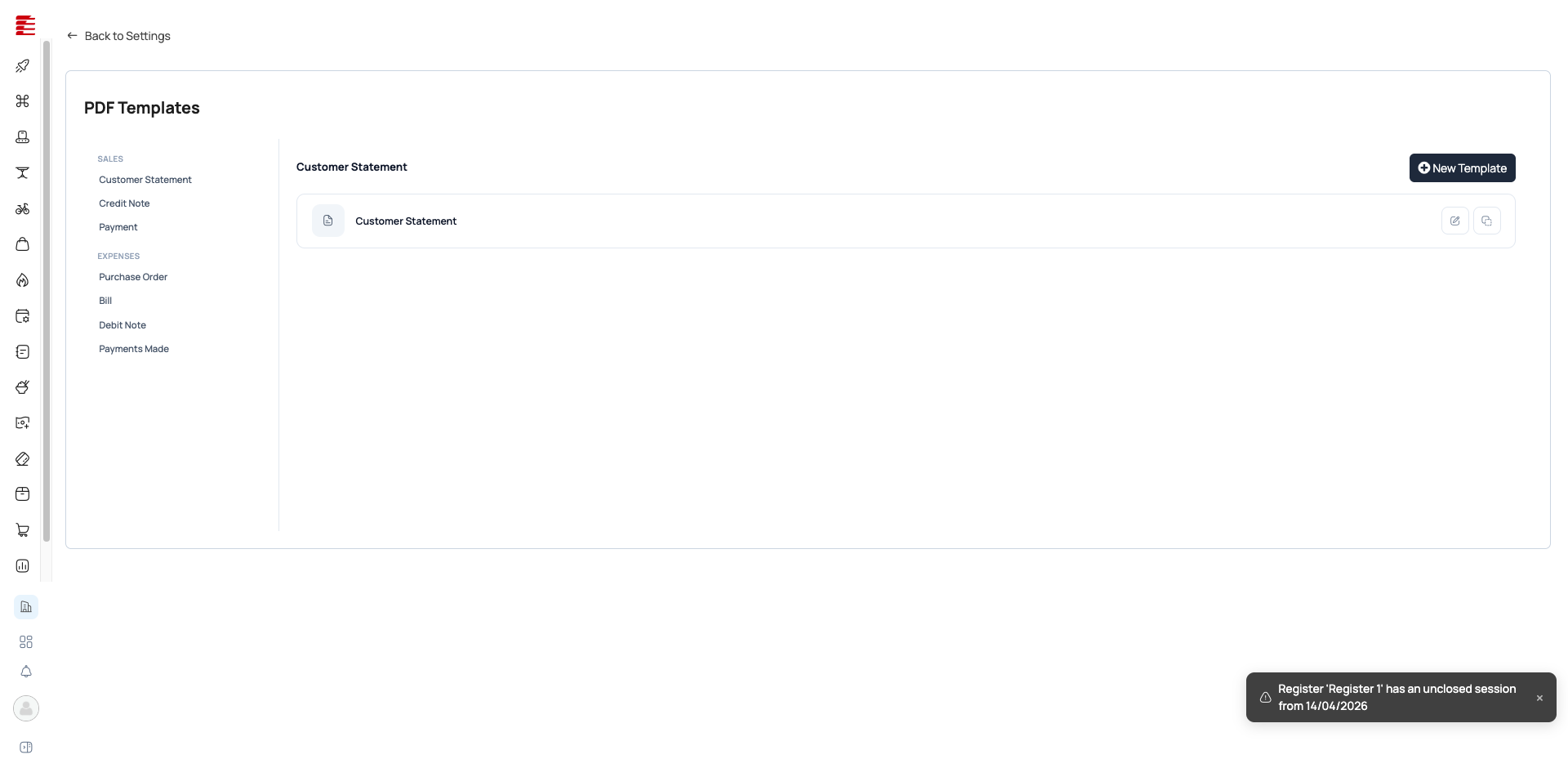
Templates are grouped by document type:
Sales templates: Customer Statement · Credit Note · Payment Expense templates: Purchase Order · Bill · Debit Note · Payments Made · Customer Statement
Each template type can have multiple versions. The active one is used for new documents; switch by clicking the template and marking it active.
Important: NEW (2026-05): visual block-builder editor replaces the HTML-textarea modal Clicking New Template or Edit on a template no longer opens a small HTML-textarea modal — it now navigates to a dedicated full-page document template editor (Zoho-Books-style) at
/settings/customisation/pdf-templates/new(or/:id/edit)[code: foodops-admin-app/apps/admin/src/pages/settings/customisation/pdf-templates/TemplateEditorPage.tsx; commit f4cadc0 2026-05-26]. It's a three-column layout: a Palette of drag-and-drop blocks (Heading, Text, Image/Logo, Spacer, Divider, Row/Column, Company/Customer Address, Key-Value Table, Doc-Number Heading, Line-Items Table, Totals, Signature, Footer Text, Custom HTML — 15 block types), a paper-sized Canvas with margin guides and header/footer regions, and a context-aware Properties panel. Editing an existing template loads its saved layout (legacy raw-HTML templates open wrapped in a single Custom-HTML block, so nothing is silently discarded)[code: components/settings/customisation/template-editor/deserialize.ts; commit a69b09e 2026-05-26]. Editor capabilities: drag-to-reorder blocks within and across header/body/footer regions, a Visual | HTML toggle (Monaco-powered code mode), a live Preview pane (client-side instant render or server-side render), undo/redo (Cmd/Ctrl+Z / Shift+Z), Cmd/Ctrl+S to save, and an unsaved-changes guard on tab close[code: commits 5cfc40d, 0d4b53c 2026-05-26].
Customisation options per template (now surfaced through the visual editor + Properties panel):
- Logo — Image/Logo block; upload company logo, position via the block
- Header / Footer — header/footer regions with their own blocks (free-form text, addresses, etc.), toggleable and per-page-positionable
- Block-level styling — heading/text styling per block; insertable
{{token}}placeholders for document/line-item data - Field visibility — Line-Items Table block exposes per-column visibility (e.g., hide TIN on walk-in receipts, show it on tax invoices)
- Paper size & orientation — A4 / Letter / Legal / A5, portrait/landscape, with margins, set at the template level
How templates are selected and rendered (new stack)
- Storage / CRUD: templates are
DocumentTemplaterows, keyed by entity type (entityTypeId— Invoice=2, Payment=3, CreditNote=4, Quote=13, SalesOrder=25, plus CustomerStatement). The admin editor saves viadocumentTemplateService.[code: foodops-admin-app/apps/admin/src/services/documentTemplateService.ts; hubits-api-sales/Hubits.Sales.Api/Controllers/DocumentTemplatesController.cs:GetTemplates(entityTypeId) @ main] - Selection: which template a document uses is resolved per org/entity by
DocumentTemplateHelper.GetTemplateFor(auto-seeds a default if none), and an invoice's chosen template comes from the sales register'sInvoiceTemplateId(the invoice'sPrintTemplate).[code: hubits-api-sales/.../DocumentGenerationService.cs:276-312 (invoice.PrintTemplate / "Check that the sales register has InvoiceTemplateId configured"); haafai.domain DocumentTemplateHelper @ staging] - Rendering:
DocumentGenerationServiceresolves the template HTML (DocumentTemplateHelper.ResolveContent), inlines private images, and converts to PDF viaHtmlToPdfService.ConvertHtmlToPdf(an HTML→PDF service).[code: hubits-api-sales/.../Services/Counter/Documents/{DocumentGenerationService.cs,HtmlToPdfService.cs} @ main]
Note: Renderer re-pointed — NOT haafai.app.common Earlier versions of this entry cited
haafai.app.commonReportService(wkhtmltox) as the renderer. That is the legacy monolith path. In the new stack the rendering pipeline ishubits-api-sales(DocumentGenerationService+HtmlToPdfService) usingDocumentTemplateHelperfromhaafai.domain. (The print brokerfoodops.app.printinghandles thermal/physical printing of receipts/KOTs — distinct from this A4 document-PDF pipeline.)
Transaction Series

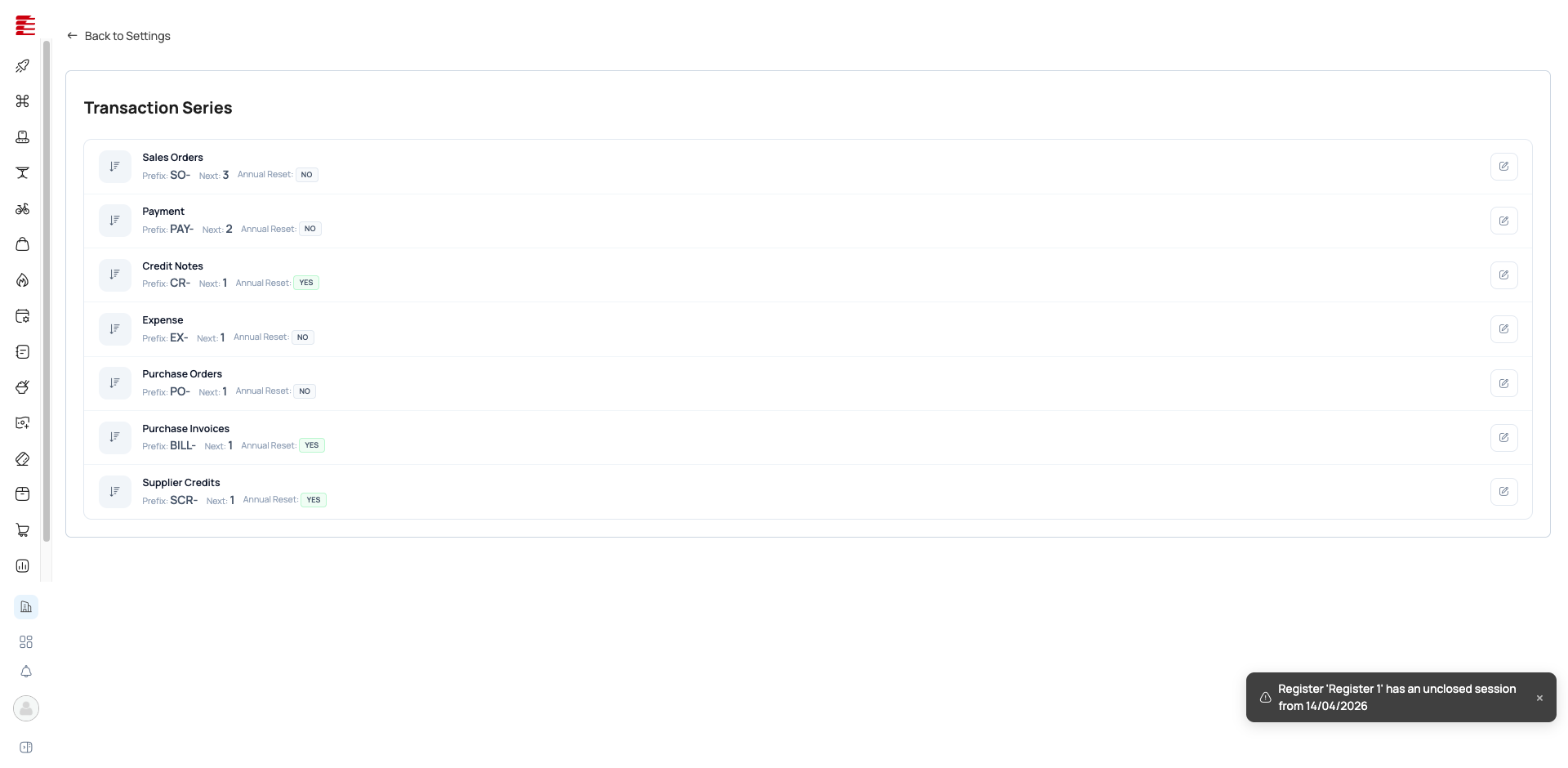
Seven built-in series:
| Series | Prefix | Next | Annual Reset |
|---|---|---|---|
| Sales Orders | SO- | 3 | No |
| Payment | PAY- | 2 | No |
| Credit Notes | CR- | 1 | Yes |
| Expense | EX- | 1 | No |
| Purchase Orders | PO- | 1 | No |
| Purchase Invoices | BILL- | 1 | Yes |
| Supplier Credits | SCR- | 1 | Yes |
Info: Annual Reset Series with Annual Reset = Yes reset their counter to 1 on January 1 each year. The year is appended (e.g.,
CR-0001/2026→CR-0001/2027). Series without annual reset increment forever. Choose based on your accounting conventions.
Each series is editable:
| Field | Purpose |
|---|---|
| Prefix | Text before the number (e.g., "SO-", "INV-") |
| Next Number | The next number to be assigned. Manually adjustable if you need to skip or align |
| Annual Reset | Whether the counter resets each January 1 |
Key concepts
- PDF Template — the rendering blueprint for a document type. Controls visual layout, branding, field visibility. Multiple templates per type; one active at a time.
- Transaction Series — the numbering convention for a document type. Prefix + auto-incrementing number + optional year reset.
- Annual Reset — counter resets to 1 each year. Useful for fiscal-year-aligned numbering (tax authorities sometimes require sequential numbering per year).
- Next Number — adjustable. Use with caution — skipping numbers can trigger audit questions. Backdating (setting a lower number) is allowed but creates non-sequential records.
- Thermal receipt — 80mm-width template for POS thermal printers. Different from A4 templates used for emailed/printed invoices.
Common questions
Q: How do I add my logo to receipts? A: PDF Templates → pick the relevant template (e.g., "Payment" for POS receipts) → upload logo. It appears on every future print/email of that template type.
Q: Can I have a different receipt look per outlet? A: Templates are org-wide by default. Multi-brand setups on higher plans can assign different templates per brand. For single-brand multi-outlet, all outlets share the same template.
Q: What happens if I edit a Transaction Series prefix mid-year? A: New documents get the new prefix; past documents keep the old one. Both coexist in reports — not recommended mid-year for audit clarity.
Q: The "Next Number" shows 3 for Sales Orders but I've only created 1 order — why? A: Voided or draft orders may have consumed numbers without completing. Transaction series assign numbers at creation, not at completion — cancelled orders still "use up" a number for audit traceability.
Q: Can I create custom series (e.g., for delivery notes)? A: The 7 built-in series cover standard document types. Custom series for arbitrary documents aren't exposed in the UI — contact support if you need one.
Q: The template editor looks completely different now — where did the HTML box go? A: As of the 2026-05 release, editing a template opens a full-page visual block-builder (drag-and-drop blocks, live preview) instead of the old single HTML-textarea modal. The raw HTML is still there — flip the editor's Visual | HTML toggle to edit it directly. Existing templates that were authored as raw HTML open inside a single Custom-HTML block, so your old layout is preserved.
- 2026-07-23 (codebase, foodops-admin-app 70e66bc..e188062): Two editor-facing additions to the block-builder, neither contradicting existing entry claims. (1) The Properties panel's per-block styling (currently described only generically as 'heading/text styling per block') gained concrete controls — Font size (px), Font family (a fixed PDF-safe font-stack list: Arial, Helvetica, Times New Roman, Georgia, Courier New, Verdana, Tahoma, Trebuchet MS, or inherit-default), Style (Bold/Italic toggle buttons), and a Color picker — serialized into the block's inline CSS (font-size/-weight/-style/-family/color) confirmed by new serialize.test.ts cases. (2) A new org-level 'Table Properties' dialog (TablePropertiesDialog.tsx, ported from the legacy POS) lets admins configure the Line-Items Table block's shared settings across ALL templates at once: a Labels tab (per-column visibility/width/label for Line Item Number, Item, Quantity, Rate, Discount, Amount — Description/Warehouse/Tax columns round-trip but aren't surfaced in this tab) and a Layout tab (table border toggle/color, plus font-size/background/font-color styling for the header row, item row, and item-description row). This is a materially richer mechanism than the entry's current one-line 'Field visibility — Line-Items Table block exposes per-column visibility' bullet — worth expanding that bullet into its own subsection once a screenshot of the dialog is available. Both changes are additive; no evidence of changes to PdfTemplatesPage.tsx/TransactionSeriesPage.tsx behavior (diffs unavailable) or to Transaction Series. (auto-applied by the truth pipeline; adversarially gated)
- 2026-07-14 (codebase, hubits-api-sales 6f242ad..e31810a): GenerateQuoteDocument now eager-loads BillingAddress/ShippingAddress (with Country) via new EF Include/ThenInclude calls — a bug fix so the Quote PDF's {{Billing Address}}/{{Shipping Address}} template tokens (which render Model.BillingAddress?.AddressLine1..Country.Name) no longer come out blank from a null navigation property. Scoped to GenerateQuoteDocument only; doesn't touch DocumentTemplatesController, HtmlToPdfService, or any other document type's generation path, so the entry's 'How templates are selected and rendered' subsection remains accurate as written. Worth a one-line mention if this entry's token/placeholder documentation is expanded to call out per-document-type address rendering. (auto-applied by the truth pipeline; adversarially gated)
- 2026-07-11 (codebase, foodops-admin-app 5c36f1b..e6e2d0e): Two editor-facing changes worth folding in. (1) Template scoping: the editor Toolbar gained an OutletSelector wired to a new
template.outletId/setOutletId— templates can now be scoped to a single outlet instead of only org-wide/per-brand, contradicting the 'all outlets share the same template' Q&A (edit above). (2) Visual↔HTML round-trip behavior changed: editing in the Monaco HTML view now collapses the entire block body into onecustom-htmlblock via a newSET_BODY_HTMLaction (previously it appended/updated a custom-html block alongside the existing visual blocks, which fought re-serialization and made the editor feel uneditable per the commit's own rationale). Switching back to Visual mode now calls a newPARSE_BODY_HTMLaction that re-expands that single block throughhtmlToBlocks, so hand-edited HTML becomes structured blocks again (best-effort; anything unrecognized stays as text/custom-html). Neither change affects Transaction Series or the block palette/Properties panel structure; the Common-Questions Q&A on raw-HTML editing remains directionally accurate but doesn't mention the collapse-on-edit / re-expand-on-return mechanic. (auto-applied by the truth pipeline; adversarially gated) - 2026-07-04 (codebase, hubits-api-sales 1bbfd90..35483db): DocumentTemplatesController gained a new GET /resolve-invoice endpoint that resolves which invoice PDF template a Quote→Invoice conversion would apply, so the Convert dialog can pre-select it. It confirms and fleshes out this entry's existing claim that 'an invoice's chosen template comes from the sales register's InvoiceTemplateId' — the full fallback chain is: active register's InvoiceTemplateId → outlet's default template → any outlet template → org default template → any org template. No change to the PDF Templates or Transaction Series settings-page behavior documented here; worth folding this precedence detail into the 'How templates are selected and rendered' subsection next time this entry is touched. (auto-applied by the truth pipeline; adversarially gated)
Success: Verified 2026-04-16 · playwright Status:
stable· Review due: 2026-07-15 Both pages verified live. 7 transaction series confirmed with exact prefix/next-number/annual-reset values from the test org.
Note: Code-verified 2026-05-04 · codebase Verified_by:
codebase· Last verified: 2026-05-04 ·haafai.app.foodops:4fdfac7Curatedsource_repos[]toHaafai.Layouts/Areas/Settings/{Controllers/{Templates,SequenceNumberTypes}Controller.cs,Views/{Templates,SequenceNumberTypes}/**}— PDF Templates live underHaafai.Layouts(notHaafai.Restaurant.Appas the old glob assumed), and Transaction Series isSequenceNumberTypesin code. No commits to either curated path since 2026-04-15: TemplatesController last touched4fdfac72026-03-24 (mappers refactor); SequenceNumberTypes inactive since 2025. HIGH-drift flag was a false positive from broken globs. UI labels and the 7 series unchanged from 2026-04-16 playwright pass.
Note: Re-pointed after backend microservice split 2026-06-03 · codebase Verified_by:
codebase· Last verified: 2026-06-03 ·haafai.app.foodops:bf7c9d2+foodops-admin-app:f3ae3e9+haafai.app.common:004e2d5Two repos added:
haafai/foodops-admin-app(backoffice settings UI, prodmain): globapps/admin/src/{pages/settings/customisation/{PdfTemplatesPage.tsx,TransactionSeriesPage.tsx,pdf-templates/**},components/settings/customisation/**}— the React backoffice hosts the PDF Templates page, the template-editor (pdf-templates/TemplateEditorPage.tsx+components/settings/customisation/template-editor/**), the Transaction Series page, and the sequence-number / document-template form dialogs.haafai/haafai.app.common(shared PDF/document rendering NuGet, prod branchmaster): globHaafai.Admin.Common/Services/{BaseReport.cs,BaseReportService.cs,ReportService.cs,Interfaces/IReportService.cs}— the shared report/document rendering layer (HTML→PDF via thelibwkhtmltoxengine inHaafai.Admin.Common) that materializes the PDF documents these templates define. Note: actual rendering is the wkhtmltox-basedReportService, not QuestPDF as the split-domain note suggested. All paths verified viagh api ...?ref=main(admin-app) /?ref=master(common). Monolith glob still resolves onmain; re-pinned to prod HEADbf7c9d2. Did NOT addfoodops.apiorhubits.microservices.
Important: Content update 2026-06-04 · codebase — PDF template editor rewritten (real user-facing change) Verified_by:
codebase·foodops-admin-app:mainThe backoffice replaced the basic HTML-textarea modal with a full-page visual block-builder editor (Zoho-Books-style) on a dedicated route/settings/customisation/pdf-templates/{new,:id/edit}. Landed acrossf4cadc0(scaffold, 2026-05-26),5cfc40d(DnD reorder + Monaco HTML mode + preview pane, 2026-05-26),0d4b53c(keyboard shortcuts + unsaved-changes guard, 2026-05-26),a69b09e(legacy-HTML preservation + ContentJson round-trip, 2026-05-26), and3bf9174(logo repair, 2026-06-01). Updated the "PDF Templates" section + added a Common-Question Q&A. Transaction Series section unchanged (no commits toTransactionSeriesPage.tsxorSequenceNumberTypessince cutoff). NOTE: the Import Wizard also became a real React page (ImportWizardPage.tsx, commit06cf8aa2026-06-03) but that page belongs to the Settings Overview entry, not this one. Driver commit3a73eb6("creating new entities in comboboxes and enhance quote handling") was a red herring for this entry — its only customisation touch was CSS-only layout tweaks totemplate-editor/Toolbar.tsx. The shared PDF renderer (haafai.app.commonReportService, wkhtmltox) is unchanged —004e2d5still HEAD; re-verified, backend rendering pipeline unchanged.
Important: Re-verified 2026-06-29 · codebase — NEW-STACK re-point (legacy app.foodops retired) Verified_by:
codebase·foodops-admin-app:f6ffd0b+hubits-api-sales:19190b9+haafai.domain:e138944Legacyhaafai.app.foodopsremoved fromsource_repos. Renderer re-pointed: droppedhaafai.app.common(legacy wkhtmltoxReportService) and pointed at the new-stack pipeline —hubits-api-salesDocumentGenerationService+HtmlToPdfService, template content viahaafai.domainDocumentTemplateHelper, CRUD viaDocumentTemplatesController. CHANGES: (1) URLs/settings/templates→/settings/customisation/pdf-templates,/settings/templates/transactions→/settings/customisation/transaction-series; (2) added a "selection & rendering" subsection (templates keyed byentityTypeId; invoice template via sales-registerInvoiceTemplateId). The block-builder editor section (TemplateEditorPage +documentTemplateService) re-confirmed present onmain. RESIDUAL: the Sales/Expenses template category list + 7 transaction-series values are screenshot-derived (legacy) and not re-read againstPdfTemplatesPage.tsx/TransactionSeriesPage.tsxfield-by-field this pass — flag for re-check.
Related
- Settings Overview — Customisation section
- POS Takeaway Order — where receipts are printed
- Shops Bills — uses the Purchase Invoices series
- Suppliers & POs — uses the Purchase Orders series