Plain-English summary
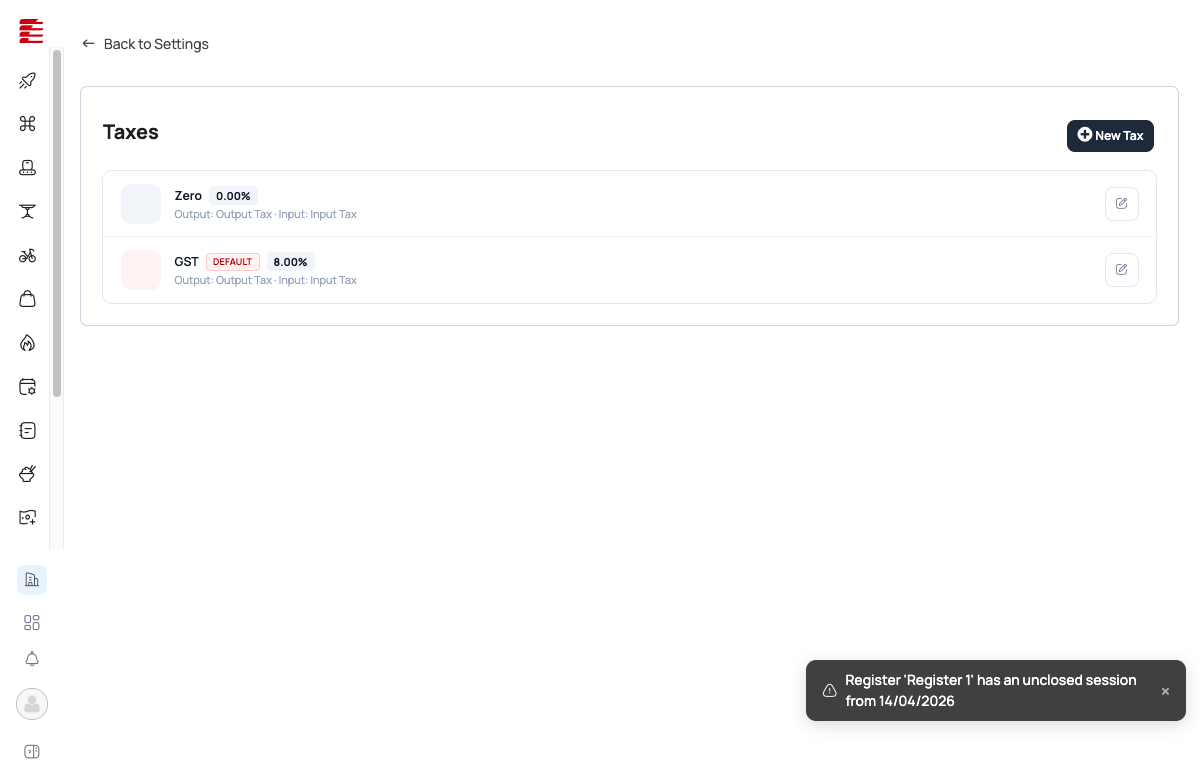
Foodops ships with two tax rates: Zero (0%) and GST (8%, default). Every menu item and every purchase is tagged with one of these. On sales, the tax becomes Output Tax (collected from customers). On purchases, it becomes Input Tax (paid to suppliers). At GST filing time, you net the two — if you collected more Output than you paid Input, you owe the difference to MIRA (Maldives Inland Revenue Authority). The Input/Output Tax Statement reports are the filing prep.
When you'd use this
- Initial org setup — verify the default GST rate matches your jurisdiction
- Adding a new tax rate (e.g., Tourism Goods & Services Tax — T-GST 16% if applicable)
- Monthly GST filing — run Input + Output Tax Statements to prepare the return
- Zero-rating specific items (exports, certain exempted goods)
How to access
- URL:
/settings/organization/taxes(admin backoffice — admin.foodops.io) - Sidebar: Settings → Accounting → Taxes (in the new stack Taxes sits under the Accounting group, not Organization)

The legacy
app.foodops.ioSettings → Taxes page is retired at the July-2026 launch. Tax-type config now lives in the admin backoffice — the tax-type list plus add/edit dialog.
Built-in tax rates
| Tax | Rate | Default? | Output account | Input account |
|---|---|---|---|---|
| Zero | 0.00% | No | Output Tax | Input Tax |
| GST | 8.00% | Yes | Output Tax | Input Tax |
"Default" means new items are created with this tax rate unless manually changed.
How taxes flow through the system
Info: Tax is applied per line, from each item's own tax type The Taxes page only defines the available tax types. Application happens at order time: every order line is stamped with its product variant's
TaxTypeId, and the per-line tax components are seeded from the variant's tax junction — there is no single flat order-level multiplier.[code: hubits-api-sales/Hubits.Sales.Api/Services/Counter/Orders/OrderCreationService.cs:577 "salesOrderLineItem.TaxTypeId = productVariant.TaxTypeId;" + :590-594 seeds SalesOrderLineItemTax {TaxTypeId = pvt.TaxTypeId, TaxRate = pvt.TaxType.Value} @ main]. A mixed-rate receipt shows the first taxed line's rate on the summary tax row (legacy receipt parity) — the actual charge is still the sum of the per-line amounts.
On a sale (Output Tax)
Item: Chicken Shawarma @ MVR 45.00 (before tax)
Tax: GST 8% → MVR 3.60
Customer pays: MVR 48.60
The MVR 3.60 is Output Tax — you collected it on behalf of the government.
On a purchase (Input Tax)
Supplier invoice: 10kg chicken @ MVR 200.00 (before tax)
Tax: GST 8% → MVR 16.00
You pay supplier: MVR 216.00
The MVR 16.00 is Input Tax — you paid it to the supplier, claimable against your Output Tax.
Net position for GST filing
Output Tax collected this month: MVR 3,600
Input Tax paid this month: -MVR 1,200
Net GST payable to MIRA: MVR 2,400
Info: Input/Output Tax Statements The Input Tax Statement and Output Tax Statement reports (see Reports Catalogue) generate the exact numbers needed for your GST return. Run them monthly, verify against your accounting, and file.
Adding a new tax rate
Click Add tax on the Taxes page. The "New tax" dialog now has five fields:
| Field | Purpose |
|---|---|
| Name | Rate label (e.g., "T-GST", "Reduced Rate") |
| Rate (%) | Tax percentage |
| Input Tax Account | Chart-of-accounts select — required |
| Output Tax Account | Chart-of-accounts select — required |
| Default tax | Toggle — whether new items default to this rate ("Applied to new items by default") |
Note: Output / Input tax accounts are editable again, sourced from the chart of accounts A prior pass of the admin backoffice dropped the Output/Input account dropdowns from the "New tax" dialog (accounts were passthrough-only IDs). That has been reversed: the dialog now includes Input Tax Account and Output Tax Account selects populated from
taxService.listAccounts(), and both are required on save —inputTaxAccountId/outputTaxAccountIdare now user-chosen and validated, not passed through unchanged. The Taxes list page also now shows the resolved account name/code in new Input Tax / Output Tax columns.[code: foodops-admin-app/apps/admin/src/components/settings/organization/TaxFormDialog.tsx — if (!inputAccountId) hasError=true; if (!outputAccountId) hasError=true; payload = {..., inputTaxAccountId: Number(inputAccountId), outputTaxAccountId: Number(outputAccountId)} @ main]
Key concepts
- Output Tax — collected from customers on sales. Your liability to the government.
- Input Tax — paid to suppliers on purchases. Your credit against Output Tax.
- Net GST — Output minus Input. Positive = you owe; negative = refund claimable.
- Zero-rated — taxed at 0%. Different from tax-exempt: zero-rated items still appear on tax returns (at 0%), exempt items don't appear at all.
- Default tax — the rate auto-assigned to new items. Only one rate can be default at a time.
- Historical integrity — changing a tax rate in Settings only affects future transactions. Past orders/POs keep the rate they were created with.
Common questions
Q: GST rate changed nationwide — do I update the existing "GST" rate or create a new one? A: Create a new rate ("GST New" at the new %). Edit the old one to inactive. This preserves the historical rate on past orders — editing the existing rate's percentage would misrepresent historical data in reports.
Q: Can I have item-level tax overrides? A: Yes — each item has its own tax-rate assignment. The default just pre-fills; you override per item as needed (e.g., bottled water at Zero, hot food at GST).
Q: Does Foodops automatically file GST with MIRA? A: No — Foodops generates the reports. You or your accountant file manually using the report numbers.
Q: What's the difference between Zero-rated and not having a tax at all? A: Zero-rated items appear on tax statements at 0% — important for GST compliance because some zero-rated items still count toward your GST-registered turnover. Items without any tax assignment don't appear on tax statements at all, which could trigger compliance gaps.
Q: Can I set different tax rates per outlet? A: No — tax rates are org-wide. Different jurisdictions (e.g., a franchise across countries) require separate Foodops orgs.
Success: Verified 2026-04-16 · playwright Status:
stable· Review due: 2026-07-15 Two built-in rates confirmed on live settings page (Zero 0%, GST 8% DEFAULT).
Note: Code-verified 2026-05-04 · codebase Verified_by:
codebase· Last verified: 2026-05-04 ·haafai.app.foodops:4fdfac7Curatedsource_repos[]toHaafai.Sales/Areas/Settings/{Controllers/TaxesController.cs,Views/Taxes/**}(real Razor monolith path; previous glob was a placeholder). No commits to the curated path since 2026-04-15 — last was4fdfac72026-03-24 (mappers refactor, no behavior change). HIGH-drift flag was a false positive from broken globs. UI unchanged from the 2026-04-16 playwright pass.
Note: Re-pointed after backend microservice split 2026-06-03 · codebase Verified_by:
codebase· Last verified: 2026-06-03 ·haafai.app.foodops:bf7c9d2+foodops-admin-app:f3ae3e9Addedhaafai/foodops-admin-app(backoffice settings UI, prodmain) with globapps/admin/src/{pages/settings/organization/TaxesPage.tsx,components/settings/organization/TaxFormDialog.tsx,components/settings/organization/DeleteTaxDialog.tsx}— the settings tax-rate config (list + add/edit form + delete) in the React backoffice. Paths verified viagh api ...?ref=main. Scoped to the settings tax-rate config surface, not the separate tax-filing/returns feature underapps/admin/src/pages/taxes/**(TaxReturns/TaxSummary), which is a distinct reporting feature. Monolith glob still resolves onmain; re-pinned to prod HEADbf7c9d2. Did NOT addfoodops.apiorhubits.microservices.
Important: Re-verified 2026-06-29 · codebase — NEW-STACK re-point (legacy app.foodops retired) Verified_by:
codebase·foodops-admin-app:f6ffd0b(main) +hubits-api-sales:19190b9(main) Legacyhaafai.app.foodops(app.foodops.io Blazor monolith) is retired at launch — removed fromsource_repos. Tax-type config is now the admin-app "New tax" dialog (TaxFormDialog.tsx) backed byhubits-api-salesSettingsController(taxesendpoints). CHANGES: (1) URL/settings/taxes→/settings/organization/taxes, and the page moved from the Organization group to the new Accounting settings group (settingsNavConfig.tsgroupaccounting); (2) the add/edit dialog now collects only Name / Rate (%) / Default — Output account & Input account dropdowns removed from the form (IDs persist as passthrough); (3) added a code-confirmed note that tax is applied per-line from each item'sTaxTypeIdat order time (OrderCreationService.cs:577,590-594), replacing any flat-rate reading. Built-in Zero/GST rates retained as org seed data (not a code claim). Re-pinned to prod HEADs.
Related
- Settings Overview — taxes configuration location
- Reports Catalogue — Input Tax Statement + Output Tax Statement
- Suppliers & POs — Input Tax on purchases
- POS Takeaway Order — Output Tax on sales