
NEW stack only (2026-06-29, July-2026 launch). The legacy
haafai.app.foodopsBlazor monolith (its/recipespage +Haafai.Inventorycontrollers) is retired at launch. Recipes / bills-of-materials now live in the inventory API (hubits-api-inventoryBillOfMaterialsApiController+ProductsApiController), are authored from the admin app (foodops-admin-app— each item's Recipe tab and Costing → Recipe Costing), and stock deduction on sale runs in the shared domain (haafai.domainBillOfMaterialHelper/StockHelper). AnyHaafai.Restaurant.App/Haafai.Inventory(monolith) citation below is historical. NOTE: a confirmed code-audit P1 (B2) found POS-sale stock posting can fail / land on the wrong warehouse in the new stack — treat the "stock deducts on sale" flow below as the intended behavior pending that fix.
Plain-English summary
A recipe tells Foodops what ingredients go into a menu item and how much of each. When a customer orders that menu item at the POS, the system automatically deducts the ingredients from stock and calculates the exact food cost of that sale. Restaurants use this to track profitability dish-by-dish and to keep inventory accurate without manual counting.
When you'd use this
Any time you want to know "how much did that burger actually cost us to make?" or "am I running low on chicken?" Recipes turn the POS from a sales tool into a real inventory system. Without recipes, stock levels don't change when you sell food — they only change when you receive purchases or manually adjust. With recipes, every sale is automatically accounted for.
How to access
- Per-item recipe: each item's Recipe tab in the admin app (admin.foodops.io — Catalog → Items → item → Recipe)
[code: foodops-admin-app/apps/admin/src/components/menu/tabs/RecipeTab.tsx @ f6ffd0b] - Recipe costing: Costing → Recipe Costing in the admin app
[code: foodops-admin-app/apps/admin/src/pages/costing/RecipeCostingPage.tsx @ f6ffd0b] - Ingredients: tracked as inventory items (see Ingredients)
- The legacy monolith
/recipespage (pestle-and-mortar sidebar icon) is retired at the July-2026 launch.
Prerequisites
Before creating recipes, make sure these exist:
- Menu items — you can only create a recipe for an item that already exists on the menu (Menu → Items)
- Ingredients — raw materials must be set up as inventory items first. Without any inventory items, the ingredient picker has nothing to search
- Unit-of-measure consistency — purchase units (e.g., kg of chicken from supplier) must convert cleanly to recipe units (e.g., 150g per serving). Set up UoMs in Settings before you start
Walkthrough — create a recipe
1. Open the Recipes list
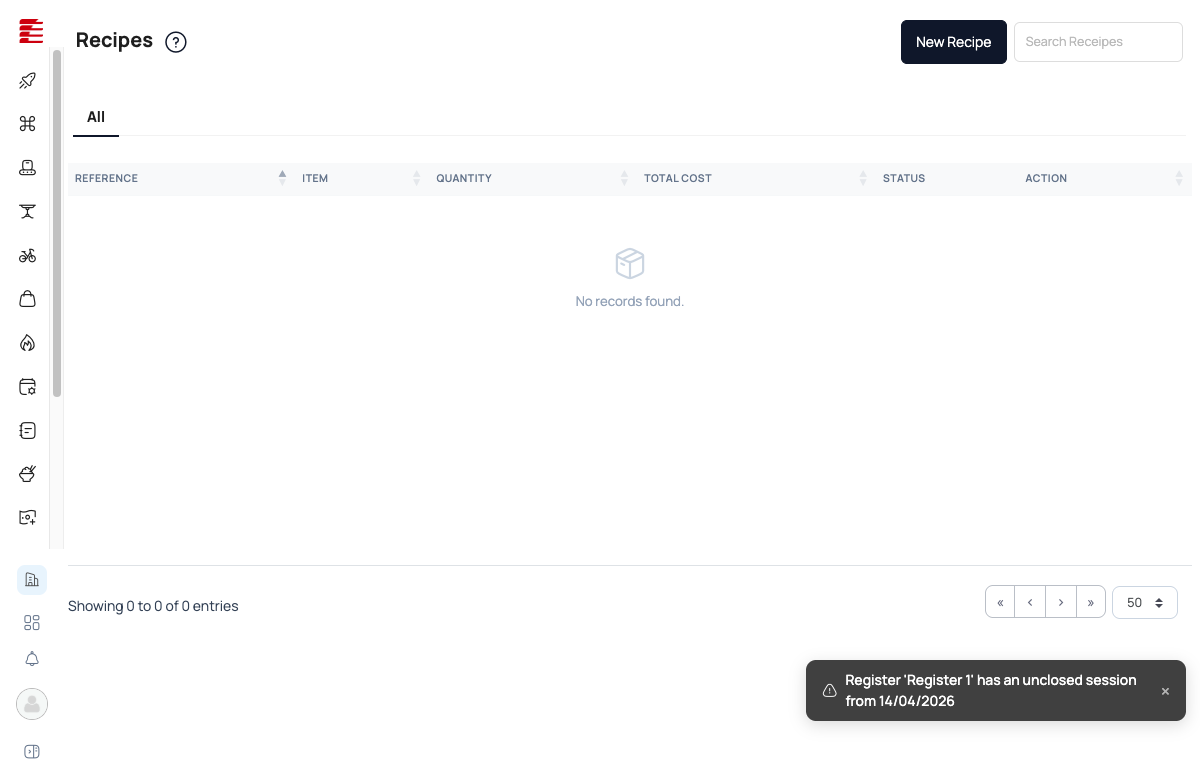
Navigate to /recipes via the sidebar. The list view shows all existing recipes with columns:
| Column | Content |
|---|---|
| REFERENCE | Auto-generated recipe reference code |
| ITEM | The menu item this recipe is for |
| QUANTITY | Yield (portions per batch) |
| TOTAL COST | Sum of all ingredient costs at current prices |
| STATUS | Active / Draft / Archived |
| ACTION | Edit / duplicate / delete |
Empty state shows "No records found". Click New Recipe (top-right) to create the first one.
2. Fill the New Recipe form
A modal opens with these fields:
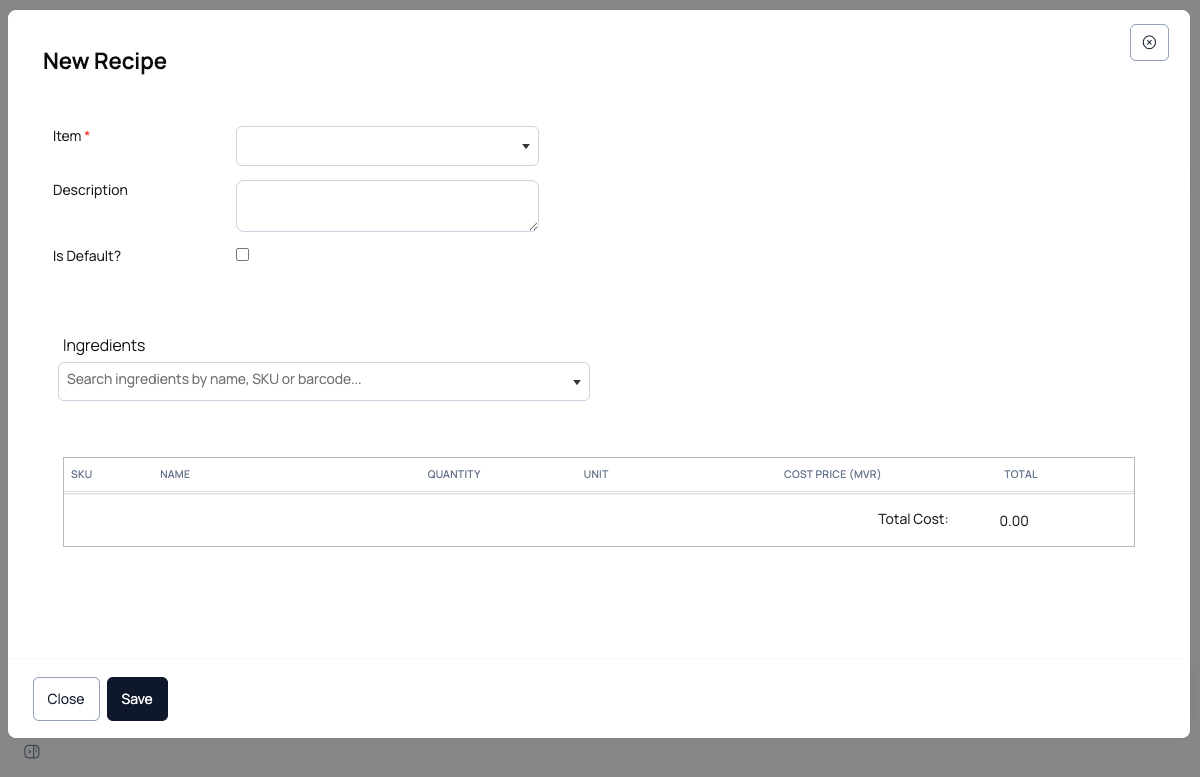
| Field | Purpose |
|---|---|
| Item ⃰ | Required. Dropdown of all active menu items (e.g., Chicken Shawarma, Beef Shawarma, Hummus, Kunafa). The recipe will be attached to this item |
| Description | Free-text notes — used for prep instructions or internal recipe cards |
| Is Default? | Check if this is the primary recipe for the item. When multiple recipes exist for the same item (e.g., breakfast vs dinner variants), the default is used for stock deduction and default cost reporting |
| Ingredients | Search your inventory by name, SKU, or barcode. Select adds the ingredient to the table below |
3. Add ingredients
For each ingredient, fill in:
| Column | Meaning |
|---|---|
| SKU | Inventory SKU of the ingredient (auto-filled from the picker) |
| NAME | Display name (auto-filled) |
| QUANTITY | How much goes into ONE portion of the menu item |
| UNIT | Unit of measure (g, ml, pcs) |
| COST PRICE (MVR) | Current cost per base unit, pulled from the ingredient's inventory record |
| TOTAL | Auto-calculated: QUANTITY × COST PRICE |
The Total Cost at the bottom of the table sums all ingredient TOTAL values — this is the food cost of one serving of the menu item.
4. Save
Click Save. The recipe is created, appears in the Recipes list, and is ready to be used.
What happens when an order is placed
Once a recipe is linked to a menu item as the default:
- A customer orders that item at the POS (Counter, Takeaway, Dine-in, or Delivery)
- Order status transitions to Closed (or the kitchen marks items ready)
- Foodops looks up the default recipe for the item
- For each ingredient, deducts
order_quantity × recipe_quantityfrom stock - If any ingredient drops below its low-stock threshold, an alert fires on the Dashboard and the shopping list auto-updates
- The sale is tagged with its food cost, feeding the "Sales Insights" and "Food Cost %" reports
If an item is sold without a recipe linked, no stock deduction happens and food cost reporting shows that item as untracked.
Key concepts
- Recipe (BOM) — the Bill of Materials for a menu item. Defines the ingredient mix for one portion. Foodops uses it for two things: stock deduction and food cost.
- Ingredient — a raw material tracked as inventory. Name, SKU, unit of measure, cost price, current stock, low-stock threshold. Suppliers link to ingredients, not to menu items.
- Sub-recipe — a recipe used as an ingredient in another recipe. Examples: "garlic sauce" used across 5 menu items; "pizza dough" used across all pizzas. Creating a sub-recipe once and nesting it means one ingredient cost change cascades to every dish using it.
- Default recipe — when a menu item has multiple recipes, one is flagged "Is Default?" — that's the one the POS uses for cost calculation and stock deduction.
- Food cost % — the industry-standard profitability metric.
(Ingredient cost / Selling price) × 100. Healthy targets: 25% for drinks, 28–35% for food, 40%+ is a warning. - Margin — the absolute money left after ingredient cost.
Selling price − Ingredient cost. High-margin, low-cost items carry the menu. - Yield — how many portions one batch makes. Useful for prep-heavy items (e.g., one batch of biryani serves 10).
Common questions
Q: I linked a recipe to an item but stock isn't being deducted. Why? A: Check (a) the recipe is marked "Is Default?", (b) all ingredients exist in inventory with a current stock value (not just zero — they must be tracked), and (c) the order moved to Closed or Ready status. Stock doesn't deduct on order creation, only on completion.
Q: Can I have multiple recipes for the same menu item? A: Yes — useful for variations (breakfast pancakes vs dessert pancakes with different syrups) or cost scenarios (premium vs standard ingredient mix). Only one can be marked Is Default at a time — that's the one used automatically.
Q: What if an ingredient's cost changes? A: Update the ingredient's cost price in inventory. Every recipe using that ingredient recalculates its Total Cost automatically. Running "Recipe Cost Report" after a price change shows which menu items now have a food cost problem.
Q: How do I handle waste / spillage / yield loss? A: Two ways: (1) bake an allowance into the recipe quantity (e.g., 160g chicken for a 150g portion), or (2) track it separately as an inventory adjustment reason. Industry best practice is to track waste separately so the recipe stays clean.
Q: Can I import recipes from a spreadsheet? A: Not directly from the Recipes UI. Recipe import is possible via the bulk-import features when setting up a new org (contact support for the template). For ongoing additions, the form is the intended flow.
Q: Does Foodops calculate suggested prices from food cost? A: Not automatically — you set the menu price manually. But the reports show food-cost % for every item, so re-pricing based on target margin is a guided exercise: divide cost by your target cost-%, get the suggested selling price.
Q: What happens when I sell an item that has no recipe? A: The sale is recorded normally — revenue, tax, the whole nine yards — but no inventory is deducted and food cost reporting flags the item as "untracked". Perfect for imported snacks, bottled drinks, or items you buy ready-to-sell.
Q: My ingredient list is empty even though I've added products to the menu — why? A: Menu items and ingredients are different things. Menu items are what customers order; ingredients are the raw materials you bought. Add ingredients by going to the inventory / products area and creating them as inventory items first, then they'll appear in the ingredient picker here.
Q: Can I track labour cost as part of the recipe? A: Not at the recipe level — Foodops focuses on ingredient cost. For true prime-cost reporting (ingredients + labour), you'd combine recipe-cost reports with payroll data outside the system.
Edge cases and known issues
"No records found" in the ingredient picker
- Symptom: Open the recipe form, try to search for an ingredient, results are empty
- Cause: No inventory items exist yet — the picker searches inventory, not the menu
- Workaround: Navigate to the products/inventory section, create ingredients (name, SKU, unit, cost), then return to Recipes
Cost shows 0.00 even with ingredients added
- Symptom: Recipe has ingredients but Total Cost is 0.00
- Cause: The ingredient's cost price isn't set — inventory item was created without a cost
- Workaround: Edit the ingredient in inventory, set its cost price, return to the recipe and refresh
Sub-recipe nesting circular reference
- Symptom: Adding an ingredient to a recipe returns an error — "This ingredient would create a circular recipe reference: ..." — and the ingredient is not added
- Cause: The ingredient you're adding is itself a sub-recipe (has its own Active recipe) whose chain loops back, directly or transitively, to the recipe you're editing
- Workaround: The API rejects the add outright before it's persisted — there's no self-reference left in the recipe to remove afterward. Pick a different, non-circular ingredient instead
Stock not deducting for items sold under draft
- Symptom: Order saved as draft but stock stayed the same
- Cause: Drafts don't deduct stock — only accepted orders do. This is intentional so that cancelled drafts don't over-deduct
- Workaround: If you need to reserve stock on draft, track it manually; otherwise accept the order to trigger deduction
Plan limits
Plan tiers and their limits are not listed here — they are DB-backed and change with the lineup. See Pricing for the live catalogue.
API and integration notes
- Recipes (BoM) link a product/variant to its ingredient products — both live in the inventory service (
hubits-api-inventory); the BoM is keyed byproductVariantId[code: hubits-api-inventory/Hubits.Inventory.Api/Controllers/BillOfMaterialsApiController.cs @ 04df7a9] - Cost calculation runs server-side on save; the Total Cost is materialized, not computed on every read
- Stock deduction fires when the sale posts (order close), via the shared domain
StockHelper/BillOfMaterialHelper(haafai.domain) — kitchen-side item-ready events do not deduct. (See the launch-banner note re: code-audit B2 stock-posting bug.) - Sub-recipe references are resolved transitively at cost-calculation time; the circular-reference check runs before save
- Recipe cost reports aggregate from
SalesOrderItem.RecipeCostSnapshot(the cost captured at the time of sale, not the current cost) — this keeps historical reports stable when ingredient prices change
Related
Purchasing & Suppliers — how ingredients get into stock in the first place
POS Takeaway Order — the sales side that triggers stock deduction
Settings Overview — unit-of-measure configuration
User Stories: Recipes — US-REC-001 through US-REC-007
User Stories: Inventory — ingredient stock management
2026-08-16 — foodops-admin-app b4aa220..ab9b67f (RecipeTab.tsx, cited surface). The 'Output Unit' dropdown in the per-recipe header edit UI (added 2026-07-12, never folded into this entry's body — still only in this Verification history) changes its data source: the old
unitOfMeasureService.dropdown()call fetched every unit of measure in the system into a flatallUnitsarray shared across all recipes; this diff removes that service call and theallUnits/UnitOfMeasureimport entirely, replacing it withensureUnits(productVariantId)populating aunitsByVariantmap keyed by variant, with an inline comment: 'Output unit must be convertible to the recipe's own output variant unit, same as ingredient line units — not just any unit in the system.' The dropdown's option list now reads fromunitsByVariant[productVariantId]instead of the globalallUnits. This is a real narrowing of the Output Unit picker from 'every UoM in the system' to a per-variant, presumably conversion-scoped list — plausibly wiring into the still-open UoM-conversion thread this history has tracked since 2026-07-22 (per-item unit-conversion CRUD) and 2026-08-04 (library-conversions endpoints), thoughensureUnits/unitsByVariant's own implementation (and thus the exact filtering rule) isn't in this diff to confirm byte-for-byte. Does not contradict anything this entry currently documents — the entry's body never describes the Output Unit dropdown or its unit list at all (only this Verification history's 2026-07-12 note mentions it, flagged as not-yet-folded-in). Recommend continuing to hold this alongside the 2026-07-22/2026-08-04 conversion-endpoint threads for a single future admin-app UI re-walk before adding an 'Editing an existing recipe' / unit-conversion subsection — do not describe the exact scoping rule from the comment alone. (auto-applied by the truth pipeline; adversarially gated)2026-08-09 — foodops-admin-app 755ef86..3db92a1 (RecipeCostingPage.tsx, cited surface). The useState/useEffect→useQuery migration (commit 77207d3, already logged 2026-08-05) and the cellClassName/headerClassName→hideBelow column-prop refactor (already logged 2026-08-06, matches the current fef5be1 pin) both reappear in this wider diff — no new claim from either. NEW since the fef5be1 pin: a
useNavigateimport plus anonRowClick={(r) => navigate('/costing/recipes/${r.id}')}handler added to the Recipe Costing list's DataTable, with an inline comment: 'The list shows a total; the detail shows which ingredient produced it. Without this the trail from any costing report ended at a number.' This adds a previously-undocumented drill-down — clicking a row in the Recipe Costing list now navigates to a per-recipe detail route (/costing/recipes/:id) that, per the comment, breaks a recipe's Total Cost down by contributing ingredient. Doesn't contradict anything currently documented: the entry only points at the Recipe Costing page via 'How to access' and references 'Recipe Cost Report' output in Common questions — it never describes the list's row-click behavior or claims no detail view exists. The commit-subject list for this range includes 'fix mobile screen top bar, and item details view on mobile screens', which plausibly (not confirmed via a per-commit diff) is the source of this hunk — 'item details view' matches a row→detail navigation, and could be the intended way to reach a recipe's detail on mobile now that action buttons hide below md/lg breakpoints. No diff evidence yet of what the detail route itself renders — only inferred from the comment. Recommend a follow-up once the/costing/recipes/:idpage's own diff or a live UI re-walk is available, to add a short 'Recipe Costing detail view' note (per-ingredient cost breakdown) under Key concepts or a new subsection — do not describe the detail page's contents from this comment alone. (auto-applied by the truth pipeline; adversarially gated)2026-08-07 — haafai.domain 0b8f5ce..b062606 (StockHelper.cs, BillOfMaterial.cs, BillOfMaterialLineItem.cs, BillOfMaterialHelper.cs, plus two brand-new files BillOfMaterialVersion.cs/BillOfMaterialVersionLineItem.cs — all within this entry's cited surface). The StockHelper.cs fully-rejected-delivery fix and the BillOfMaterialLineItem.cs QuantityBasisId/TrimYieldPercentOverride/EffectiveCostPrice additions (REC-02/REC-03) are the SAME commits already logged by the 2026-08-05 and 2026-08-06 notes — no new claim there. What this wider diff range newly exposes, not visible in prior evidence: (1) BillOfMaterial.UpdateTotals' actual implementation — for an edible-portion line with no override and no already-loaded ProductVariant, it now explicitly loads the variant via EF, and THROWS InvalidOperationException if the line is Detached rather than silently treating the yield as 100%; GetSnapShot's audit-log dictionary also now carries Cooking Yield %/Portion Count/Portion Size/Portion Unit (REC-04 fields). (2) The full entity definitions for BillOfMaterialVersion and BillOfMaterialVersionLineItem (REC-01) — previously only inferred from RecipeVersionHelper.CutIfChangedAsync call sites, now visible as effective-dated snapshot rows with VersionNumber, EffectiveFromUtc/EffectiveToUtc, an IsBackfilled flag for migration-reconstructed history, and a composition key that includes not just Quantity/UnitId/line-items but ALSO the REC-04 portion/yield fields (CookingYieldPercent, PortionCount, PortionSize, PortionUnitId) — refining the 2026-08-06 note's narrower description of the composition key. TotalCost/CostBasisUtc are frozen at version-cut time and explicitly excluded from the composition key, so a later recost never retroactively rewrites a version's cost. Neither entity carries an enforced FK to master data (unit/product/variant/user) by design, so master-data deletes never get blocked by version history. None of this contradicts anything this entry currently documents (Walkthrough Step 3's QUANTITY × COST PRICE and the API notes' 'materialized on save' claim both still hold for the default AsPurchased path, which is what every line gets absent an explicit EdiblePortion declaration). No foodops-admin-app diff evidence in this range shows whether/where recipe version history, portion/yield fields, or quantity-basis selection surface in the UI. Recommend continuing to hold REC-01/03/04 as backend-only pending admin-app UI evidence before folding into Key concepts or the Walkthrough — do not edit the entry's cost-calculation or Yield prose from this diff alone. (auto-applied by the truth pipeline; adversarially gated) (auto-applied by the truth pipeline; adversarially gated)
2026-08-07 — hubits-api-inventory e6f63ea..e41f1f1 (BillOfMaterialsApiController.cs + ProductsApiController.cs, within this entry's cited surface). Two backend capabilities land, one of which contradicts a documented Edge Case (see edits[]: 'feat(bom): reject line items that would create a circular recipe reference' — AddLineItem now calls BillOfMaterialCycleValidator.FindCycleAsync and returns 400 before the line is ever persisted, rather than allowing a save that needs cleanup after). Separately, REC-01 (recipe versioning, not yet described anywhere in this entry) is introduced: BillOfMaterialsApiController's Create/Update/AddLineItem/UpdateLineItem/RemoveLineItem and ProductsApiController's own BOM-edit path all now call RecipeVersionHelper.CutIfChangedAsync after mutating a recipe, which cuts an immutable version snapshot whenever a composition-key field (Quantity, UnitId, or the line-item set) changes — cosmetic edits (rename, Is-Default toggle, UnitCost-only recost) correctly cut nothing per the inline comments. No admin-app diff evidence in this range shows whether/where version history surfaces in the UI. Also, ProductsApiController's BOM-edit path was fixed to call bom.UpdateTotals(_dbContext) instead of a hand-rolled CostPrice×Quantity sum that had silently under-costed edible-portion lines since REC-03 landed (2026-08-06 note) — scoped to that one code path, doesn't change any documented claim. Recommend folding REC-01 into Key concepts once UI evidence confirms if/how recipe version history is exposed to users; do not guess at UI placement from this backend-only diff. (auto-applied by the truth pipeline; adversarially gated)
2026-08-06 — foodops-admin-app 755ef86..fef5be1 (RecipeCostingPage.tsx, cited surface). This range's base (755ef86) is the same base already diffed in the 2026-08-05 note, so the useState/useEffect→useQuery migration hunk here is the SAME commit already logged then (77207d3, also the frontmatter's current pin) — no new claim from that part; underlying fetch is confirmed still unchanged (
costingService.listRecipes({ pageSize: 200 }), still client-side filtered/paginated). What IS new since that pin: a small column-display refactor replacing each hidden column'scellClassName/headerClassName: 'hidden md:flex'(orlg:flex) pair with a singlehideBelow: 'md'/'lg'prop, for the Category, Ingredients, and Last Costed columns. Same breakpoints preserved (md/lg unchanged), same columns affected — this reads as a mechanical prop-API refactor (likely bundled with this range's 'fix mobile screen top bar, and item details view on mobile screens' commit) rather than a behavior change, though the DataTable component's internalhideBelowimplementation isn't in this diff to confirm byte-for-byte equivalence. This entry never describes the Recipe Costing page's column layout or responsive/mobile behavior (only references the page via 'How to access' and 'Recipe Cost Report' in Common questions), so nothing here contradicts a documented claim and nothing is deemed worth folding into the entry. No edit made. Recommend the next pipeline pass re-base the foodops-admin-app diff from 77207d3 (not 755ef86) to avoid re-surfacing already-logged commits. (auto-applied by the truth pipeline; adversarially gated) (auto-applied by the truth pipeline; adversarially gated)2026-08-06 — haafai.domain 0b8f5ce..5fb0133 (BillOfMaterial.cs, BillOfMaterialLineItem.cs, BillOfMaterialHelper.cs, StockHelper.cs — within this entry's cited surface). The StockHelper.cs hunk (fully-rejected-delivery AcceptedQty/RejectedQty fix) is the SAME commit already logged by the 2026-08-05 note (0b8f5ce..b6d8e7f) — no new claim there. NEW in this range: three domain-model additions (REC-02/REC-03/REC-04) not yet described anywhere in this entry. (1) REC-02: every BillOfMaterialLineItem now carries a QuantityBasisId (AsPurchased vs EdiblePortion) via HasValidQuantityBasis()/EffectiveCostPrice(); BillOfMaterialHelper.EnsureLineItemsDeclareBasis forces any line that arrives without a recognised basis to AsPurchased (a silent default, not a hard rejection, despite the commit subject 'reject an undeclared quantity basis' — going by method body per instructions). (2) REC-03: a line can now declare TrimYieldPercentOverride; EffectiveCostPrice() divides CostPrice by EffectiveTrimYieldPercent()/100 for EdiblePortion lines, and BillOfMaterial.UpdateTotals now sums EffectiveCostPrice() × Quantity instead of the old CostPrice × Quantity — meaning an ingredient declared 'edible-portion' with trim loss now costs MORE per unit than its raw CostPrice. (3) REC-04 (partial, model-only): BillOfMaterial gained CookingYieldPercent, PortionCount, PortionSize, PortionUnitId plus CookedOutputQuantity() and CostPerPortion() helper methods. None of this contradicts the entry's documented Walkthrough Step 3 claim ('TOTAL: Auto-calculated: QUANTITY × COST PRICE') or the API notes' 'Cost calculation runs server-side on save' claim — EnsureLineItemsDeclareBasis defaults every line to AsPurchased, under which EffectiveCostPrice() returns plain CostPrice unchanged, so existing documented behavior holds unless/until a line is explicitly marked EdiblePortion. There is no foodops-admin-app diff evidence in this range showing whether RecipeFormDialog/RecipeTab expose a quantity-basis toggle, a trim-yield-override field, cooking-yield%, or portion count/size/unit anywhere in the UI — this is a backend-only capability addition so far. Recommend a follow-up pass, once admin-app UI evidence (or a live re-walk) confirms these fields surface in the New Recipe form or RecipeTab, to add a 'Trim yield / edible portion' note to Key concepts (extending the existing Yield/Food-cost-% prose) and possibly a Walkthrough step for basis selection — do not edit the entry's cost-calculation prose from this backend-only diff alone. Also note: haafai.domain is pinned to b6d8e7f in this entry's frontmatter; this diff's head (5fb0133) is ahead of that pin and should be picked up on the next re-pin pass. (auto-applied by the truth pipeline; adversarially gated)
2026-08-05 — foodops-admin-app 755ef86..77207d3 (RecipeCostingPage.tsx, cited surface). Commit 'perf(admin): cache costing + inventory list pages with TanStack Query' replaces this page's local useState/useEffect(refreshKey) data-fetching with a TanStack Query useQuery keyed ['costing', 'recipes', { pageSize: 200 }]. The underlying fetch is unchanged — still
costingService.listRecipes({ pageSize: 200 }), still filtered/searched/paginated entirely client-side per the 2026-07-16 note's usePagination/useClientPagedRows description;loading/errorare now derived fromrecipesQuery.isPending/recipesQuery.errorinstead of local state, and both the manualrefresh()call andrecostOne's post-recost reload now go throughrecipesQuery.refetch()instead of incrementing a refreshKey counter. This does not contradict anything this entry documents (the entry never describes the Recipe Costing page's fetch/loading/caching mechanics, only points to it via 'How to access' and references 'Recipe Cost Report' output in Common questions). One plausible but unconfirmed user-facing wrinkle: TanStack Query's default caching means revisiting this page after the query has already run once could show briefly-stale cached data before a background refetch resolves, versus the prior code's guaranteed fresh fetch-on-mount — not confirmed via diff (no staleTime/gcTime override is shown) and would need a live re-walk to verify. Two other commits in this range — 'feat(units): add inline unit creation and library conversion functionality' and 'fix(billing): per-currency invoice labels + show payment failure reason' — produced no diff hunks intersecting this entry's cited surface (RecipeCostingPage.tsx / RecipeFormDialog.tsx / RecipeTab.tsx), so no claim is made about them here; the units commit is plausibly relevant to the still-open UoM-conversion thread (2026-07-22 notes) but stays unconfirmed against this entry's files pending admin-app UI evidence. No edit needed. (auto-applied by the truth pipeline; adversarially gated) (auto-applied by the truth pipeline; adversarially gated)2026-08-05 — haafai.domain 0b8f5ce..b6d8e7f (StockHelper.cs, within this entry's cited surface). Commit 'fix(stock): fully rejected deliveries no longer enter stock, cost, or tax' changes the purchase-receiving stockQty calculation at two call sites (~L899, ~L1328) from
AcceptedQty > 0 ? AcceptedQty : ReceivedQtytoRejectedQty > 0 ? AcceptedQty : (AcceptedQty > 0 ? AcceptedQty : ReceivedQty)— a delivery line with any RejectedQty now always uses AcceptedQty (so a fully-rejected line, AcceptedQty=0, contributes zero stock) instead of falling back to ReceivedQty, which previously could silently add rejected units to stock. This is a purchase-RECEIVING accept/reject workflow fix, not a change to the sale-time BOM/recipe stock-deduction path this entry documents (Walkthrough 'What happens when an order is placed'; API notes citing StockHelper/BillOfMaterialHelper for order-close deduction) — the touched method concerns receiving deliveries into stock, not consuming stock via recipe ingredients on sale. It lives in the same StockHelper.cs this entry cites, but the specific concern (purchase-order accept/reject accuracy) sits closer to the Purchasing & Suppliers domain (see Related) than to Recipes/BOM. Does not contradict anything this entry documents. Separately, this commit range's second subject — 'feat: per-quantity BOM stock reversal (recursive + modifiers), shared with cancel' — sounds directly relevant to this entry's BOM/recipe stock-deduction model (the walkthrough only describes forward deduction on order-close, never any reversal-on-cancel behavior), but no diff hunks from that commit intersect this entry's cited surface in the evidence supplied here, so nothing can be claimed about it yet. Recommend a follow-up pass once BillOfMaterialHelper.cs/StockHelper.cs diff evidence for the BOM-reversal commit is available, to check whether it changes or extends the documented order-close deduction behavior — do not guess at its effect from the commit subject alone. No edit made to this entry from the diff supplied. (auto-applied by the truth pipeline; adversarially gated)2026-08-04 — hubits-api-inventory 7effc28..e6f63ea, two commits touching this entry's cited surface. (1) 'fix(products): grouped list rows fall back to archived variants' (ProductsApiController.cs GetAll, groupByProduct=true path) fixes a bug where a fully-archived product (zero Active variants) rendered ProductVariantId=Guid.Empty, VariantCount 0, null price, and a vacuously-true IsEnabled, with row actions (edit/clone/toggle/restore) targeting an empty id and an archived row showing 'Archive' instead of 'Restore' (never actually restorable). The fix now falls back to summarizing the product's non-deleted (archived) variants when no Active variant exists, and picks that archived variant as the row's representative default instead of Guid.Empty. This is the same GetAll/groupByProduct capability the 2026-07-13 note flagged as generic Products-list functionality of unconfirmed relevance to this entry (no admin-app evidence yet showing whether the Recipe tab's ingredient picker or the Item dropdown use groupByProduct at all — the walkthrough's picker appears to use plain search, not this grouped mode) — this diff only makes that existing, still-unconfirmed-relevance feature correct for archived rows; it does not contradict anything this entry documents about ingredients or recipes. (2) 'feat(library-conversions): implement API endpoints for library conversions and apply conversion functionality' adds two new BillOfMaterialsApiController endpoints — GET library-conversions/{productVariantId} (lists standard/system unit conversions applicable to a variant's base unit, e.g. resolving 'box' → 'g', excluding conversions already configured) and POST apply-library-conversion (applies one of those standard conversions to a variant as a new alternate-unit conversion, deriving its price from the variant's base price, tagged Source=Library) — plus matching LibraryConversionResponse/ApplyLibraryConversionRequest DTOs in BomModels.cs. A code comment says this mirrors legacy MenuItemsController library-conversion behavior. This directly extends the still-open UoM-conversion thread from the 2026-07-22 note (per-item unit-conversion CRUD endpoints) with a second, complementary mechanism: instead of manually typing a custom conversion factor, a user can now pick from a pre-defined standard/library list (e.g. 'box of 12') and have it applied in one action. This is exactly the kind of capability the Prerequisites section gestures at ('purchase units ... must convert cleanly to recipe units ... Set up UoMs in Settings before you start') but neither the per-item CRUD (2026-07-22) nor this library-picker mechanism is named in that prose, and there is still no foodops-admin-app diff evidence in either range showing where/how this surfaces in the UI (a Settings UoM screen vs. a per-ingredient conversions tab). Nothing here contradicts a documented claim. Recommend continuing to hold both conversion-endpoint threads together for a single future Prerequisites/Key-concepts update once admin-app UI evidence (or a live re-walk) confirms where users actually configure/apply unit conversions — do not edit from backend-only diffs alone. (auto-applied by the truth pipeline; adversarially gated)
2026-08-01 — haafai.domain de43d6d..5249fe1 (StockHelper.cs, within this entry's cited stock-deduction surface). Commit 'fix(stock): stop DbSet.Update turning a pending SLPV insert into a 0-row update' replaces roughly a dozen
context.StockLocationProductVariants.Update(productStockLocationOut/In)calls throughout the stock in/out transaction branches withStorageLocationHelper.MarkChanged(context, ...). The bug being fixed: when a StockLocationProductVariant (SLPV) — the per-location stock row for a product variant — is newly created in memory (no DB row exists yet, still a pending EF-tracked insert) and the old code called.Update()on it, EF Core's change tracker treated the entity as already-persisted and generated a 0-row-affected UPDATE statement instead of an INSERT — silently dropping the stock-location row that should have been created.StorageLocationHelper.MarkChanged(definition not in this diff) presumably branches on tracked state (Added vs Modified) so a pending insert stays an insert. This sits directly inside the same StockHelper.cs this entry cites as the stock-deduction mechanism for recipe/BOM sales (Walkthrough 'What happens when an order is placed'; API notes 'Stock deduction fires... via the shared domain StockHelper/BillOfMaterialHelper'), and because the entity being get-or-created is location-specific (StockLocationProductVariant), this bug is plausibly related to the launch-banner's flagged code-audit B2 issue (POS-sale stock posting can fail / land on wrong warehouse) — a silently-dropped SLPV insert at a given location is one concrete way stock could fail to post correctly per-warehouse. This diff doesn't prove it IS the B2 root cause (no audit cross-reference here) and doesn't touch BillOfMaterialHelper or any recipe-specific call site, so it's unclear whether recipe-ingredient deduction specifically exercises the fixed code paths versus general stock in/out transactions (receiving, transfers, adjustments). Nothing here contradicts a documented claim — the entry never described SLPV persistence mechanics. Recommend flagging this as a candidate partial-fix for B2 in a future pass once confirmed against the actual audit ticket or BillOfMaterialHelper call-site evidence, but do not edit the launch banner's B2 warning from this diff alone (it may be one contributing bug among several, not a full fix). (auto-applied by the truth pipeline; adversarially gated) (auto-applied by the truth pipeline; adversarially gated)2026-07-25 — haafai.domain e3b54b4..ddcae33 (StockHelper.cs, within this entry's cited stock-deduction surface). Commit 'feat(stock): honor forceAllowNegativeStock so paid POS sales allocate + go negative even when AllowNegativeStock is off' adds a new
forceAllowNegativeStockparameter (default false) toAllocateStockToInvoice, the shared allocation routine this entry cites as part of the sale-time stock-deduction path. When a caller passestrue(per the commit subject: for paid POS sales), every existingproductVariant.AllowNegativeStockgate in this method is OR'd with the new flag — so a sale can now allocate stock past zero and post negative inventory even for products whose per-item AllowNegativeStock setting is off, instead of returning the 'Insufficient stock for invoice' failure. A new code path also handles the case where real StockTrackingSerial rows are fully exhausted but quantity is still owed: previously this justbreaks (silently stops short); now, if negative stock is allowed (by setting or by this new force flag) and no synthetic serial was already created, it fabricates one so the leftover posts as negative stock rather than being dropped. This entry documents recipe-driven deduction only at the level of 'deducts order_quantity × recipe_quantity from stock' (Walkthrough §'What happens when an order is placed') and never describes what happens when stock is insufficient at the point of sale, so nothing here is contradicted. However this is a genuine, not-yet-documented behavior change to the exact mechanism (StockHelper) the entry names for stock deduction, and it plausibly interacts with the launch-banner's flagged code-audit B2 issue (POS-sale stock posting can fail / land on wrong warehouse) — this diff doesn't fix B2 (no warehouse-routing change here) but does change what 'stock posting can fail' means for paid POS sales going forward. No admin-app/counter-app evidence in this range shows whetherforceAllowNegativeStock=trueis actually the code path invoked for recipe/BOM ingredient deduction specifically (vs. general product-line invoice stock) — the call site setting this flag isn't in this diff. Recommend a follow-up pass, once the call site (BillOfMaterialHelper or the POS invoice-creation path) is confirmed to passforceAllowNegativeStock=truefor recipe-ingredient deduction, to add a short note under 'What happens when an order is placed' or 'Edge cases' clarifying that a paid POS sale will now proceed and post negative ingredient stock rather than block, superseding the current silent-gap in the walkthrough. Do not edit the entry's stock-deduction prose from this diff alone. (auto-applied by the truth pipeline; adversarially gated)2026-07-22 — foodops-admin-app 985570b..35146e3 (RecipeTab.tsx, cited surface). Commit 'feat: allow editing recipe output quantity' adds a new 'Output Quantity' input to the per-recipe header edit UI (the same inline edit affordance already documented by the 2026-07-04 note as supporting rename/Is-Default and by the 2026-07-12 note as supporting an Output Unit dropdown). New
editQuantitystate is seeded frombom.quantityon edit-open, rendered as a numeric input (min 0, step any) next to the existing Output Unit field, and on savehandleSaveHeadernow client-side validatesNumber(editQuantity)is finite and > 0 (toast error 'Output quantity must be greater than 0' otherwise) before sendingquantity: parsedQuantitytobomService.updatealongside name/unitId/isDefault. This means a recipe's output quantity — which this entry's Key Concepts section describes only narratively as 'Yield... how many portions one batch makes' — is now directly editable from the same per-item Recipe tab, not just set at creation. Does not contradict any documented claim (the entry never described Yield/output quantity as fixed post-creation or detailed the header-edit fields exhaustively). Two other commit subjects in this range ('Fix alcyon issues'; 'show "Use as Ingredient" for Service items to match legacy behavior') produced no diff hunks intersecting this entry's cited surface, so no claim is made about them here. Recommend folding this into the still-pending 'Editing an existing recipe' subsection (flagged 2026-07-04, 2026-07-12) alongside Output Unit, once a live UI re-walk confirms how the Output Quantity field interacts with per-ingredient ratios/Total Cost display — do not edit the Yield concept text from diff alone. (auto-applied by the truth pipeline; adversarially gated) (auto-applied by the truth pipeline; adversarially gated)2026-07-22 — hubits-api-inventory 468b93d..a44d2df (BillOfMaterialsApiController.cs + BomModels.cs, within this entry's cited surface). Commit 'feat: add per-item unit conversion CRUD endpoints to bill-of-materials API' adds three new endpoints to BillOfMaterialsApiController: GET unit-conversions/{productVariantId} (returns the variant's base unit plus every configured alternate-unit conversion, each with ConversionUnitName/Value/ListPrice/ListPriceWithTax/ExampleDescription), POST unit-conversions (adds an alternate-unit conversion, computing ListPrice/ListPriceWithTax as the variant's base price × the conversion Value; requires Products.Edit; rejects only an exact duplicate unit+value pair), and an in-progress PUT/update endpoint (UpdateBomUnitConversionRequest DTO added, handler body cut off in this diff range). A code comment states this deliberately mirrors legacy MenuItemsController.AddConversionFactor behavior (any unit category allowed, not just same-category) rather than using the stricter domain helper — i.e. this ports forward a conversion-factor capability that existed in the retired legacy monolith. This does not contradict anything currently documented: the entry's Prerequisites section says 'purchase units ... must convert cleanly to recipe units ... Set up UoMs in Settings before you start' but never describes a specific UI or endpoint for configuring per-item unit conversions, so there's nothing to correct. It is plausibly the backing API for that exact workflow (e.g., letting an ingredient be purchased in 'box' but consumed in 'g'), but this is a backend-only diff — no foodops-admin-app evidence in this range shows whether/where this surfaces (a Settings UoM screen, a per-product conversions tab, etc.), or whether the walkthrough's 'Set up UoMs in Settings' phrasing already refers to this same mechanism. Recommend a follow-up pass once admin-app UI evidence (or a live re-walk) confirms where this is exposed, before folding it into the Prerequisites/Key-concepts text — do not guess at UI placement from this controller-only diff. (auto-applied by the truth pipeline; adversarially gated)
2026-07-21 — hubits-api-inventory 1abec08..468b93d (ProductsApiController.cs, within this entry's cited surface). The 'match parent product name in list search' GetAll hunk in this range duplicates the already-logged 2026-07-20 note (same commit, no new claim). NEW in this range: commit 'fix: store Variant-type product variant names as "Parent/Variant" and cascade on parent rename' changes how variant Name is persisted for products with ProductTypeId == Variant. Create/AddVariant/UpdateVariant now route the incoming name through a new BuildVariantName(product.Name, rawName) helper, which forces the stored Name to '/' format (idempotent — strips a matching existing prefix before rebuilding) instead of storing whatever the user typed verbatim. Product Update also now cascades: renaming a Variant-type parent product re-prefixes every child variant's Name via RenameVariantForParent (only variants whose current head segment matches the OLD parent name are touched). This only fires for ProductTypeId == Variant — Standard/Service/Kit-Bundle products are unaffected, and the change is scoped entirely to ProductsApiController; BillOfMaterialsApiController (cost calculation, stock deduction, sub-recipe nesting) is untouched. Does not contradict anything this entry documents — the walkthrough never specifies a naming format for the ingredient-picker NAME column ('auto-filled') or the recipe Item dropdown. Worth a note if an ingredient or menu item is ever modeled as a Variant-type product: its picker/dropdown display name would now read 'Parent/Variant' (e.g. 'Chicken/Breast') rather than the bare variant name, and a parent rename would cascade into every variant's displayed name. No admin-app diff evidence in this range shows whether/how the Recipe tab's ingredient picker or Item dropdown currently render this pattern — flag for a live UI re-walk or admin-app evidence before folding into the walkthrough. (auto-applied by the truth pipeline; adversarially gated)
2026-07-20 — hubits-api-inventory 1abec08..57082c3 (ProductsApiController.cs, within this entry's cited surface). Commit 'fix(products): match parent product name in list search so variants are found by their family name' adds a fourth OR-clause to the GetAll search filter: alongside the existing pv.Name/pv.SKU/pv.Code matches, product-variant rows are now also returned when pv.Product.Name.Contains(searchTerm) — i.e. searching for the family/parent product name (e.g. 'Chicken') now surfaces its variants (e.g. 'Breast', 'Thigh') even when the variant's own name/SKU/code doesn't contain the search term. This is the same GetAll endpoint the walkthrough's Ingredients picker relies on ('Search your inventory by name, SKU, or barcode' — Walkthrough step 2, New Recipe form). Does not contradict the documented claim — search-by-name still works, this only widens what counts as a name match — it's a small user-facing search-quality fix worth a mention if this section is ever expanded to describe picker search mechanics in more depth. No edit made. (auto-applied by the truth pipeline; adversarially gated) (auto-applied by the truth pipeline; adversarially gated)
2026-07-16 — foodops-admin-app 8ebb1d2..31fa044 (RecipeCostingPage.tsx, cited surface). Commit 'test(admin): Round 2 coverage' bundle also adds client-side pagination to the Recipe Costing list: a new
usePagination({ storageKey: 'recipe-costing' })hook drives page/pageSize state (persisted per-browser),useClientPagedRows(filtered, page, pageSize)slices the already-filtered/search-matched rows for display, and a new<Pagination>control renders below the table (itemLabel 'recipes'). Search, category-filter, and status-filter changes now callreset()to snap back to page 1. Note the underlying fetch is unchanged (costingService.listRecipes({ pageSize: 200 })still pulls up to 200 recipes in one call) and the summary-card stats (statsuseMemo) still aggregate over the fullfilteredset, not just the visible page — pagination only affects which rows the DataTable renders, not cost totals or filtering scope. This doesn't contradict anything documented (the entry never described the Recipe Costing page's list mechanics, only pointed to it via 'How to access' and referenced 'Recipe Cost Report' output in Common questions) but is a new user-facing affordance worth a line if this entry ever grows a Recipe-Costing-page walkthrough. No edit made — recommend folding into a future 'Recipe Costing page' subsection alongside the still-pending live UI re-walk, rather than editing from diff alone. (auto-applied by the truth pipeline; adversarially gated)2026-07-16 — hubits-api-inventory db09019..fe5c8f4 (BillOfMaterialsApiController.cs + ProductsApiController.cs, within this entry's cited surface). No contradiction of documented recipe/BOM behavior — the diff doesn't touch cost calculation, stock deduction, or the soft-delete/restore logic itself (those were already fixed and documented in the 2026-07-09 note). What's NEW: every recipe/BOM and product mutation endpoint gained a granular role-based
[Authorize(Roles = ...)]gate, replacing the previous blanket[Authorize]/[SessionAuth](i.e. 'any logged-in user'). Reads (GetAll on both controllers) now requireInventoryRolePolicies.ProductsRead; Create actions (new recipe, add line item is Edit not Create, new product/variant, gallery upload) requireProducts.Create; Update/status-change/line-item edit/sort/toggle-enabled actions requireProducts.Edit; SoftDelete (recipe) and gallery-image delete requireProducts.Delete; Restore requiresProducts.Edit. This means a staff member's assigned role can now block recipe creation/editing/deletion at the API level even if they can reach the admin-app screen — a permission dimension this entry doesn't currently mention anywhere (walkthrough, Common questions, Edge cases). No admin-app diff evidence in this range shows whether foodops-admin-app surfaces role-based UI gating (disabled buttons, hidden actions) for these new checks, or whether staff without the right role simply hit a 403 on save. Recommend a follow-up: once admin-app evidence (or a live UI re-walk) confirms how insufficient-permission attempts surface to the user, add a short 'Permissions' note to this entry (or a cross-cutting Roles/Permissions entry) — do not guess at UI behavior from this backend-only diff. The other commit subjects in this range (warehouse status filtering, stock-location-per-warehouse, warehouse deletion regression tests, stock-doubling-on-first-adjustment fix) do not intersect this entry's cited BillOfMaterials/Products controller surface and are out of scope here. (auto-applied by the truth pipeline; adversarially gated)2026-07-13 — hubits-api-inventory 8df401c..db09019 (within this entry's cited BillOfMaterialsApiController.cs / ProductsApiController.cs surface). The BillOfMaterialsApiController.cs hunks in this range (GetAll now excludes BillOfMaterialStatus.Deleted; SoftDelete now actually sets BillOfMaterialStatusId=Deleted + calls SaveChangesAsync; Restore now actually sets BillOfMaterialStatusId=Draft + calls SaveChangesAsync) are the SAME commit already logged by the 2026-07-09 verification note ('fix(recipe): complete soft-delete/restore (set status + save)...') — no new claim there; this diff range's base (8df401c) predates the entry's current pin, so it resurfaces already-documented content rather than adding to it. What IS new in this range: ProductsApiController.cs GetAll gained two query params —
productTypeId(an exact ProductType filter, distinct from the existing IsMenuItem/IsIngredient bucket toggles) andgroupByProduct(a grouped-by-product list mode: one row per Product instead of per ProductVariant, with count/price-range/stock aggregated over the product's Active variants, ordered and paginated at the Product level). This touches the ProductsApiController surface this entry cites only for 'Ingredients are tracked as inventory items' — the feature itself is a generic Products-list capability (variant grouping + product-type filtering), not specific to Recipe/BOM authoring or stock deduction, and no admin-app diff evidence in this range shows whether/how it surfaces in the Recipe tab's ingredient picker versus a general Products/Ingredients list page. Does not contradict any documented claim. Recommend a follow-up pass (continuing the thread the 2026-07-02 note opened re: the earlier Assembly-Kit ProductsApiController addition) to determine, once admin-app UI evidence exists, whether this belongs in this Recipes entry or in a separate Products/Ingredients-focused entry — do not fold into the Recipes walkthrough without that confirmation. (auto-applied by the truth pipeline; adversarially gated)2026-07-12 — foodops-admin-app 5c36f1b..8ebb1d2 (RecipeTab.tsx, cited surface). This range's Delete-button/ConfirmDialog/soft-delete and status-dropdown-filter hunks duplicate what the 2026-07-09 verification note already logged (same bomService.softDelete(bom.id) call, same Trash2 'Delete' button, same statuses.filter excluding 'Deleted') — no new claim there. What IS new in this diff and not yet documented anywhere in this entry: the per-recipe header edit UI (already noted 2026-07-04 as supporting inline rename + Is-Default toggle) now also exposes an 'Output Unit' dropdown, populated via unitOfMeasureService.dropdown() and defaulting to the recipe's current bom.outputUnitName, letting a user change a recipe's yield/output unit of measure directly from the RecipeTab; handleSaveHeader now sends
unitId: editUnitIdto bomService.update alongside name/isDefault. This doesn't contradict the entry's existing 'Yield' concept description (Key concepts: 'how many portions one batch makes') but adds an editable-unit affordance the walkthrough/concepts section doesn't mention. Recommend folding this into the same future 'Editing an existing recipe' subsection flagged by the 2026-07-04 note, once a live UI re-walk confirms the Output Unit field's effect on cost/yield display. (auto-applied by the truth pipeline; adversarially gated) (auto-applied by the truth pipeline; adversarially gated)2026-07-09 — foodops-admin-app 5c36f1b..dbbec0a adds a soft-delete capability to the per-item Recipe tab (RecipeTab.tsx) not yet described in this entry. Each recipe header now has its own Delete button (Trash2 icon) that opens a ConfirmDialog ('Delete recipe?' / '"" will be removed from this item.'); confirming calls
bomService.softDelete(bom.id)and reloads the list. Correspondingly, the per-recipe status-change dropdown in this tab now filters out the 'Deleted' option (statuses.filter(s => s.name?.toLowerCase() !== 'deleted')) — deletion is handled exclusively via the new dedicated button/soft-delete flow rather than by manually picking 'Deleted' from the status dropdown. This does not contradict the existing 'ACTION: Edit / duplicate / delete' column documented for the separate standalone Recipes list view (per the 2026-07-04 note, that list is a distinct surface from this per-item RecipeTab component) — it adds an equivalent delete affordance to the per-item tab that the walkthrough doesn't yet cover. Recommend adding a short 'Deleting a recipe' note to the per-item Recipe tab section once a live UI re-walk confirms the confirm-dialog copy and post-delete behavior (e.g., whether a newly-orphaned default flag reassigns to another recipe). (auto-applied by the truth pipeline; adversarially gated)2026-07-09 — hubits-api-inventory 8df401c..dff6a5e (BillOfMaterialsApiController.cs, within this entry's cited surface). Commit 'fix(recipe): complete soft-delete/restore (set status + save), stamp recipe with item org, hide deleted from list' reveals the recipe soft-delete/restore path was previously INCOMPLETE: SoftDelete() and Restore() invalidated the inventory cache but never actually set BillOfMaterialStatusId or called SaveChangesAsync — so clicking 'delete' on a recipe (the entry's Walkthrough ACTION column lists Edit/duplicate/delete) was silently a no-op server-side, and GetAll() had no filter excluding deleted BOMs, so a 'deleted' recipe would never have disappeared from the Recipes list regardless. This commit fixes both: SoftDelete now sets BillOfMaterialStatus.Deleted and saves, Restore now sets BillOfMaterialStatus.Draft and saves, and GetAll now excludes BillOfMaterialStatus.Deleted rows. This does not contradict the entry (it never claimed delete was broken or working, just that the action exists) but completes a previously-silent gap — the documented delete action now actually functions as implied. No admin-app diff evidence in this range to confirm what STATUS label (Active/Draft/Archived) the UI shows for a soft-deleted recipe, so no edit made to the STATUS column claim; flag for a live UI re-walk if a 'Deleted' state ever surfaces in the admin app's STATUS column. (auto-applied by the truth pipeline; adversarially gated) (auto-applied by the truth pipeline; adversarially gated)
2026-07-04 — foodops-admin-app 88dfde2..93e9085 diff to RecipeTab.tsx (cited surface, previously pinned f6ffd0b) adds admin-app Recipe-tab capability not yet described in the walkthrough. The tab's state moved from a single
bom(old code only ever fetchedlist[0], i.e. only the FIRST recipe for a variant, ignoring any others) toboms: Bom[]fetched via Promise.all over the full list — so the per-item Recipe tab now surfaces every recipe on the item, not just one. New inline affordances were also added directly in this tab: per-line editing of quantity + unit (new pencil icon, backed bybomService.availableUnits), per-recipe header editing (rename, toggle Is Default viaeditingBomId/editName/editIsDefault), and inline status change (handleStatus→bomService.changeStatus). None of this CONTRADICTS documented claims — multiple-recipes-per-item and single-Is-Default were already documented as data-model truth (Common questions Q2) — but the walkthrough never describes this tab's own multi-recipe display or in-place editing (it only covers the New-Recipe-modal creation flow). Recommend a live UI re-walk (auth.json refresh) before adding an 'Editing an existing recipe' subsection, rather than editing the entry from diff alone. Caveat: the 5 commit subjects for this range are all about per-variant barcode/VariantBuilder work and none mention Recipe/BOM — the RecipeTab.tsx hunk's presence in this range is unexplained by the stated commit messages; treat this note as provisional pending confirmation the diff is correctly attributed to 88dfde2..93e9085. (auto-applied by the truth pipeline; adversarially gated)2026-07-02 — hubits-api-inventory 8225783..a359fd1 (checked against this entry's cited BillOfMaterialsApiController.cs / ProductsApiController.cs / BomModels.cs surface). No contradiction of documented recipe behavior: the diff CONFIRMS several already-documented claims by moving them from client-side/derived to materialized API fields — BomResponse now returns TotalCost, IsDefault, StatusId/StatusName and OutputUnit directly (matches the walkthrough's TOTAL COST/STATUS/Is-Default? columns), and BOM creation now auto-generates a Reference via SequenceNumberTypeHelper (matches the REFERENCE column claim). Also fixed a prior API bug where line-item UnitCost was hardcoded to 0 in GetById — it now returns li.CostPrice, which is what the walkthrough's COST PRICE column already assumed. Separately, ProductsApiController gained a distinct 'Assembly Kit' capability (AssemblyKitStockType, AutoAssemblyEnabled, AutoAssemblyThreshold, KitBillOfMaterialId, KitComponents) that reuses the same BillOfMaterialLineItems entity this entry's Recipe/BOM model is built on, but is scoped to PRODUCTS (auto-assembly/kitting, e.g. bundles) rather than FoodOps menu-item recipes — no admin-app UI evidence in this diff, so it's unclear if/how it's exposed yet. Flag for a follow-up pass once admin-app surfaces (or doesn't) a Kit UI, to decide whether it warrants its own KB entry (Products/Kits) distinct from this one — do not fold it into the Recipes walkthrough without UI confirmation. (auto-applied by the truth pipeline; adversarially gated)
Warning: Code-verified 2026-05-04 · codebase only (auth.json stale) Verified_by:
codebase· Last verified: 2026-05-04 Source-repo globs curated against real haafai paths (was previously the brokensrc/menu/**fallback). Recipes are authored inRecipesController.cs+Views/Recipes/**inhaafai.app.foodops; the BOM data model and product references live inHaafai.Inventory/Controllers/BillOfMaterialsController.csandProductsController.cs. No commits to any of these paths since 2026-04-15 — recipe-side code is dormant. The light counter-side hook issrc/types/recipeInstructions.ts(also dormant since repo initbe1a991). Removedfoodops.ordering.api: src/menu/**from the previous broken-glob declarations: recipes have no customer-ordering surface (they only run on the counter for stock deduction at order-close time). Verified againsthaafai.app.foodops:4fdfac7andfoodops.counter.app:be1a991. Walkthrough prose unchanged from priordraftstate; UI re-walk pending auth.json refresh.
2026-05-04 — codebase verification at haafai/haafai.app.foodops:4fdfac7, haafai/foodops.counter.app:be1a991; UI re-walk pending auth refresh
2026-06-03 — source_repos re-pointed for the 2026-06-03 backend microservice split. ADDED hubits-api-inventory (recipes/BoM API — BillOfMaterialsApiController.cs + ProductsApiController.cs + DTOs/BillOfMaterials/**) pinned to main HEAD d0dd020, and foodops-admin-app (recipe SETUP backoffice — RecipeCostingPage + RecipeFormDialog + menu tabs/RecipeTab.tsx) pinned to main HEAD f3ae3e9. All added paths verified present on main via gh api. Existing haafai.app.foodops (Recipes/BoM/Products controllers + Views) and foodops.counter.app:src/types/recipeInstructions.ts globs retained as the monolith fallback during the split — all still resolve on prod branches. No fallback/broken globs found.
2026-06-04 — content re-verification against hubits-api-inventory@d0dd020 (main). VERIFIED-NO-CHANGE. BillOfMaterialsApiController + DTOs/BillOfMaterials/** have only one post-watermark commit (a tracing/observability change 476f604); recipe/BoM data model, cost calculation, sub-recipe nesting, and the order-close stock-deduction flow are all unchanged. The 2026-06-02 IsModifier addition (4ed0add) is scoped to product-variant DTOs only — it does NOT appear in any BoM/recipe DTO, controller, or stock-deduction path, so it does not change documented recipe behavior. No edit needed; walkthrough prose retained from prior draft state. UI re-walk still pending auth refresh.
2026-06-29 — NEW-stack re-verification for the July-10 launch (legacy haafai.app.foodops monolith RETIRED). Re-pinned to prod HEADs: hubits-api-inventory@04df7a9, foodops-admin-app@f6ffd0b, haafai.domain@e1389444 (staging, ADDED — BillOfMaterialHelper/StockHelper + BoM entities, the stock-deduction home), foodops.counter.app@32669a9. Dropped the four retired haafai/haafai.app.foodops source_repos (RecipesController, Views/Recipes, Haafai.Inventory Bill/Products controllers). CONFIRMED the recipe/BoM/products surfaces all resolve on prod (inventory API controllers + admin-app RecipeTab/RecipeCostingPage present). CORRECTIONS: re-pointed "How to access" to the admin app (item Recipe tab + Costing → Recipe Costing) — the monolith /recipes page is retired; re-pointed the API-notes catalogue/BoM/stock-deduction references to inventory API + domain StockHelper/BillOfMaterialHelper. Added a launch banner flagging code-audit B2 (POS-sale stock posting can fail / wrong warehouse) so the "stock deducts on sale" flow is read as intended behavior. Human-curated Plain-English/Key-Concepts/Common-questions preserved. NOT re-walked live (code-only).
Additional verification events are appended here by the weekly KB sync and by manual re-verification passes. See _meta/failure-log.md for the global failure index.